 mizore / notes
Pulling tens of gigabytes of datasets or backups from Google Drive over a proxy usually burns through expensive data quotas and bottlenecks on proxy node bandwidth; downloading in a browser often drops partway through and forces you to start over. To solve this, I wrote gdirect: a terminal tool for browsing, downloading, uploading, and mounting Google Drive.
This post is organized into three parts: a quick TL;DR on how it "disguises" connections to reach Google directly, a ready-to-use installation and 10-minute illustrated setup guide, and finally a technical deep dive into the underlying source code.
Correction, 2026-10-26: The first version of this post said
183.56.143.147was a Googlegoogle-cnedge node on China Telecom in Guangzhou, so Drive traffic "never physically crossed the firewall". A reader, Ken, wrote in to point out that this was wrong, and we confirmed it: it is a third-party relay (reverse proxy) that forwards traffic to Hong Kong and from there to Google, and the genuine Google nodes inside China do not serve Drive at all. Since 0.7.0, gdirect sweeps the address space Google publishes as its own and finds genuine Google front ends that happen to be reachable. Since 0.8.0 it tries that relay first by default (it is fast and stable), falls back to the sweep results when it fails, and offers--google-onlyto leave relays out entirely. The post below has been corrected throughout; the investigation is in Correction and Improvements.
TL;DR: How Do We Connect Directly Without a Proxy?
On networks in mainland China, Google Drive's domains (drive.google.com, www.googleapis.com, drive.usercontent.google.com) are blocked. DNS for drive.google.com is poisoned with addresses that belong to someone else; the other two resolve to real Google IPs, but those IPs are blackholed at the TCP level.
Google has far more addresses than DNS ever hands out, though. Google publishes every range it owns (goog.json); subtract the part it leases to Google Cloud customers (cloud.json) and what remains is the address space of Google's own services. Servers there sit behind Google's front-end serving layer (GFE, the Google Front End: the component Google's security whitepaper describes as handling TLS termination, DDoS protection and load balancing), which routes each request to a backend service by its HTTP Host header and holds valid certificates for *.googleapis.com and *.googleusercontent.com. In our tests, some of these front ends are directly reachable from inside China, probably because domestic DNS never hands them out and so they have not made it onto the blocklist.
gdirect takes advantage of this by "opening TCP to a reachable Google front-end IP while sending authentic Google Drive requests (hostnames and certificate checks) over TLS and HTTP":
- Point the underlying TCP socket at a scanned endpoint: bypassing poisoned system DNS,
gdirectconnects straight to port 443 on the target IP. Candidates come only from Google's published address space: TCP first, then full verification only for addresses that answer (official Google certificate + Drive v3 API response + test file download), stopping at 8; results are cached in local SQLite. Since 0.8.0, gdirect tries the third-party relay183.56.143.147first by default (fast and stable in practice) and falls back to the scanned Google front ends when it fails; if you don't want any third party in the path,--google-only(orGDIRECT_GOOGLE_ONLY=1) restricts it to endpoints inside Google's space. During socket creation (Rust'sreqwest::resolveand agetaddrinfohook in a patched C++libaria2), every connection stays pinned to that endpoint, even across multiple cross-domain 302 redirects mid-download. - Keep real Drive hostnames and certificate checks at the upper layers; retry under a "forged identity" when reset: the real hostname is sent by default. If a censoring middlebox resets connections carrying the real SNI (showing up as a connect error or timeout),
gdirectautomatically retries once under a forged identity: TLS connects asg.cn(a Google-owned name the front end serves a matching certificate for) and verifies the certificate againstg.cn, while the HTTPHostheader still carries the real Drive hostname such aswww.googleapis.com. GFE routes byHost, so Drive requests work as usual, and because the TLS name and the certificate name always match, certificate verification is never weakened. That is the essential difference from "just rewriting the SNI", where the certificate no longer matches. Whichever identity works is remembered in SQLite. - Certificates are anchored to Google's own GTS roots only: no general-purpose CA bundle. Google issues every endpoint we use under its own Google Trust Services roots, so verification trusts only those embedded roots. Even if a third-party CA is compromised or an intermediate key leaks (like the eMudhra key exposure made public in October 2026), it cannot be used to impersonate Google to
gdirect. This holds for the relay too: TLS passes through it untouched, so it cannot read tokens or file contents. - Fail over across endpoints: when the current endpoint stops answering, gdirect first tries the other TLS identity, then each other endpoint verified within the last day; dead endpoints are marked in the database, and downloads resume the partial file on the next one.
- Separate the control plane from the data plane: sign-in, account verification and token refreshes (
accounts.google.com,oauth2.googleapis.com,www.googleapis.com), only a few kilobytes, go through the normal system network (your proxy; since 0.8.0 the HTTP/HTTPS system proxy on macOS / Windows, orHTTPS_PROXYon Linux) so authentication always works; bandwidth-heavy directory listing, multi-connection downloads, and 32 MiB resumable uploads all go through the direct endpoint without spending proxy traffic.
| Traffic Type | Commands / Domains | Route |
|---|---|---|
| Drive API, downloads, uploads | browse, ls, download, upload (www.googleapis.com, drive.usercontent.google.com, *.googleusercontent.com) |
The relay 183.56.143.147 first, then scanned Google front ends (--google-only: front ends only). Real SNI by default, falling back to the forged g.cn identity on resets (Host stays real); fails over to the next verified endpoint. --ip, --sni / --no-sni override |
| Sign-in, account verification & token refresh | login and automatic token refresh (accounts.google.com, oauth2.googleapis.com, www.googleapis.com) |
System network (system DNS and proxy; honors the HTTP/HTTPS system proxy or HTTPS_PROXY) |
| Disk mount | mount (invokes rclone under the hood) |
System network |
Important Note for Users in Mainland China: Sign-in requests need the proxy; transfer requests need a direct path. Since 0.8.0 the easiest setup is to keep your proxy client in rule mode with the system proxy on and TUN off: on macOS / Windows,
gdirectuses the system proxy for sign-in automatically (on Linux, setHTTPS_PROXY), while scans and transfers bypass the proxy and connect directly—no direct rules needed. With TUN mode on, the traffic will likely be sent back through the proxy:gdirectconnects to Google's own overseas IPs (such as142.250.x.xor192.178.x.x), which rules routing byGEOIPor Google IP ranges send to the proxy; the TLS SNI carries a Drive hostname, so a sniffing proxy matches it against thegdirect scanwarns when nearly every address answers). If TUN must stay on, route thegdirectprocess's transfers direct—see the Mainland China Network and Proxy Configuration Guide below.
Installation
Prebuilt binaries are provided for macOS 15+ (Apple Silicon / Intel), Linux x86_64 (glibc 2.35+, e.g. Ubuntu 22.04+, Debian 12+, Fedora, Arch), and Windows x86_64.
Option 1: One-Line Install Script
macOS / Linux:
curl -fsSL https://raw.githubusercontent.com/mizorewww/gdirect/main/scripts/install.sh | bashWindows PowerShell:
& ([scriptblock]::Create((Invoke-RestMethod 'https://raw.githubusercontent.com/mizorewww/gdirect/main/scripts/install.ps1')))The installer places gdirect into ~/.local/bin (%LOCALAPPDATA%\gdirect\bin on Windows). The Google GTS root certificates used for verification are embedded in the binary, so there is no CA file to install.
If you also want to use gdirect mount to mount Google Drive as a local disk, pass --with-mount (-WithMount in PowerShell) to automatically install the mount dependencies (rclone 1.75.2+, plus fuse3 on Linux or WinFsp via winget on Windows):
curl -fsSL https://raw.githubusercontent.com/mizorewww/gdirect/main/scripts/install.sh | bash -s -- --with-mountOption 2: Homebrew (macOS / Linux)
brew tap mizorewww/gdirect https://github.com/mizorewww/gdirect
brew install mizorewww/gdirect/gdirect
brew install rclone # Only needed for `gdirect mount`; Linux also requires `fuse3` from your system package managerTo upgrade later, run brew update && brew upgrade gdirect.
One-Time Google Cloud Setup Guide (~10 Minutes)
To avoid rate-limiting (429 Too Many Requests) or bans caused by everyone sharing a single public OAuth client, gdirect does not ship a shared client ID. Instead, you create your own Desktop app OAuth client in your personal Google Cloud project. You only need to do this once, and it is completely free.
1. Create a Project and Enable the Drive API
-
Open the Google Cloud Console, click the project picker at the top of the page, and click New project in the top-right corner. Name it anything you like (e.g.
gdirect), leave Location as No organization for a personal account, click Create, and make sure the new project is selected at the top.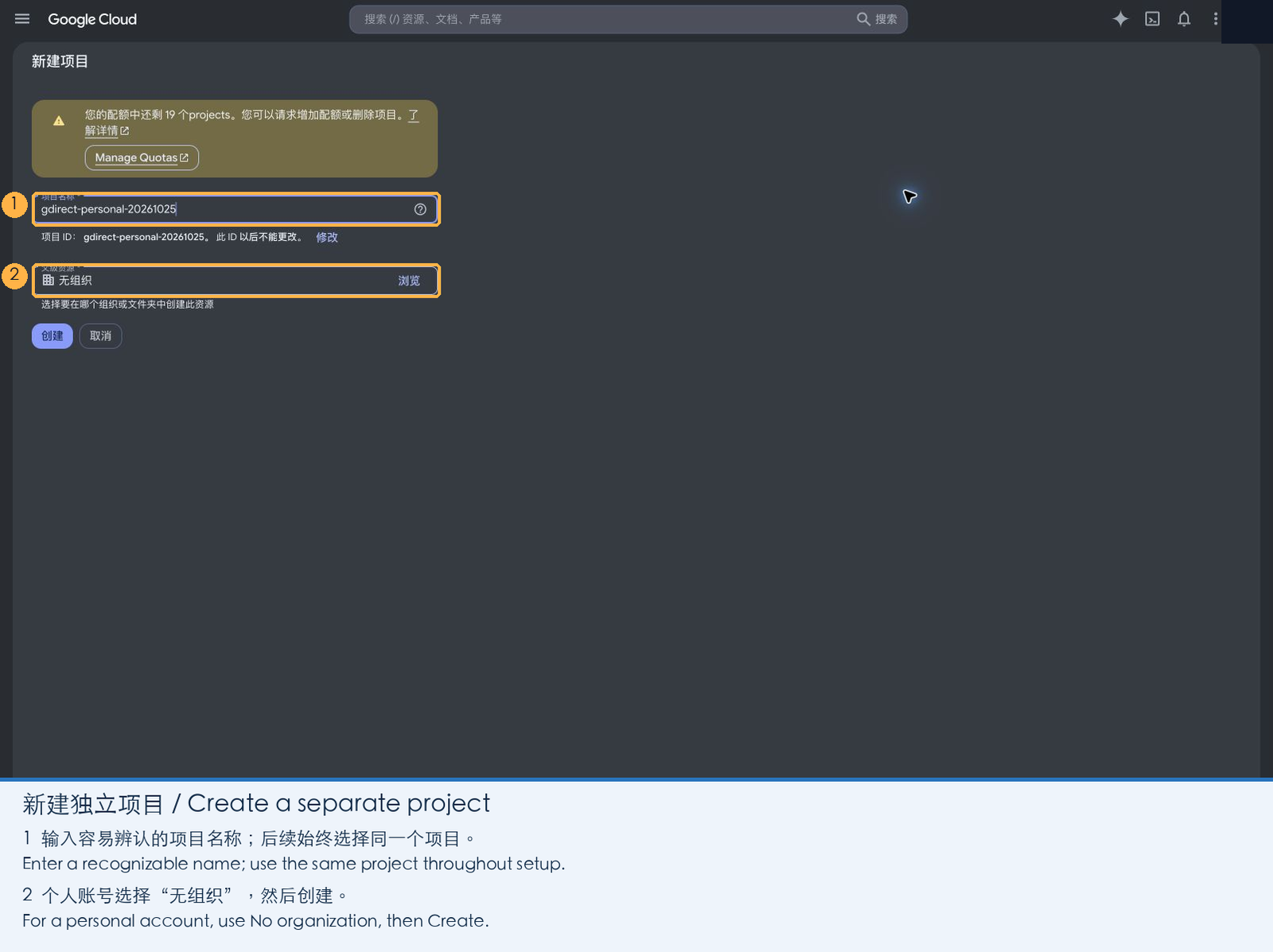
-
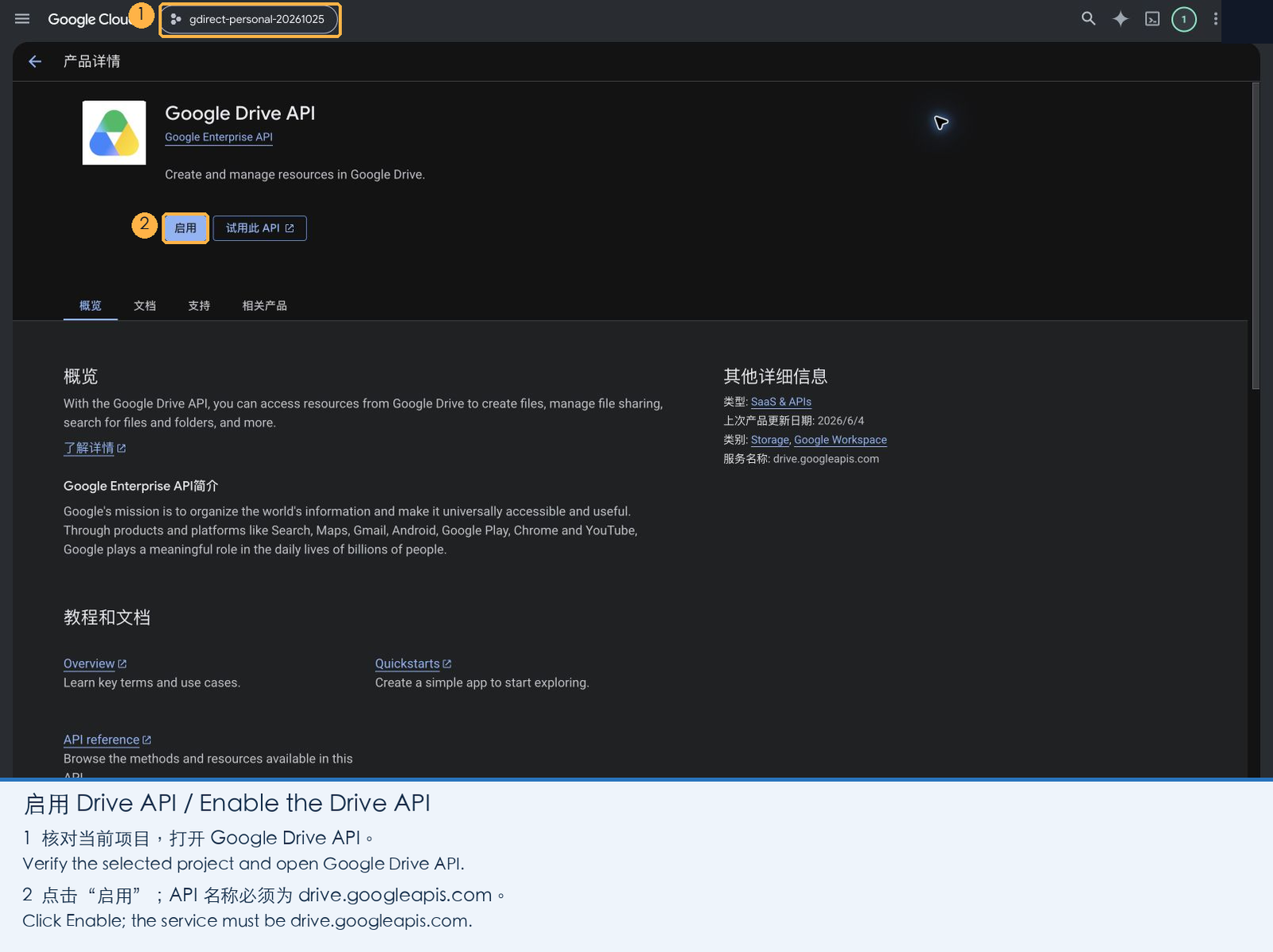
Open the Google Drive API page, confirm your new project is selected at the top, and click Enable.
Once enabled, the page shows the service name
drive.googleapis.comwith status Enabled.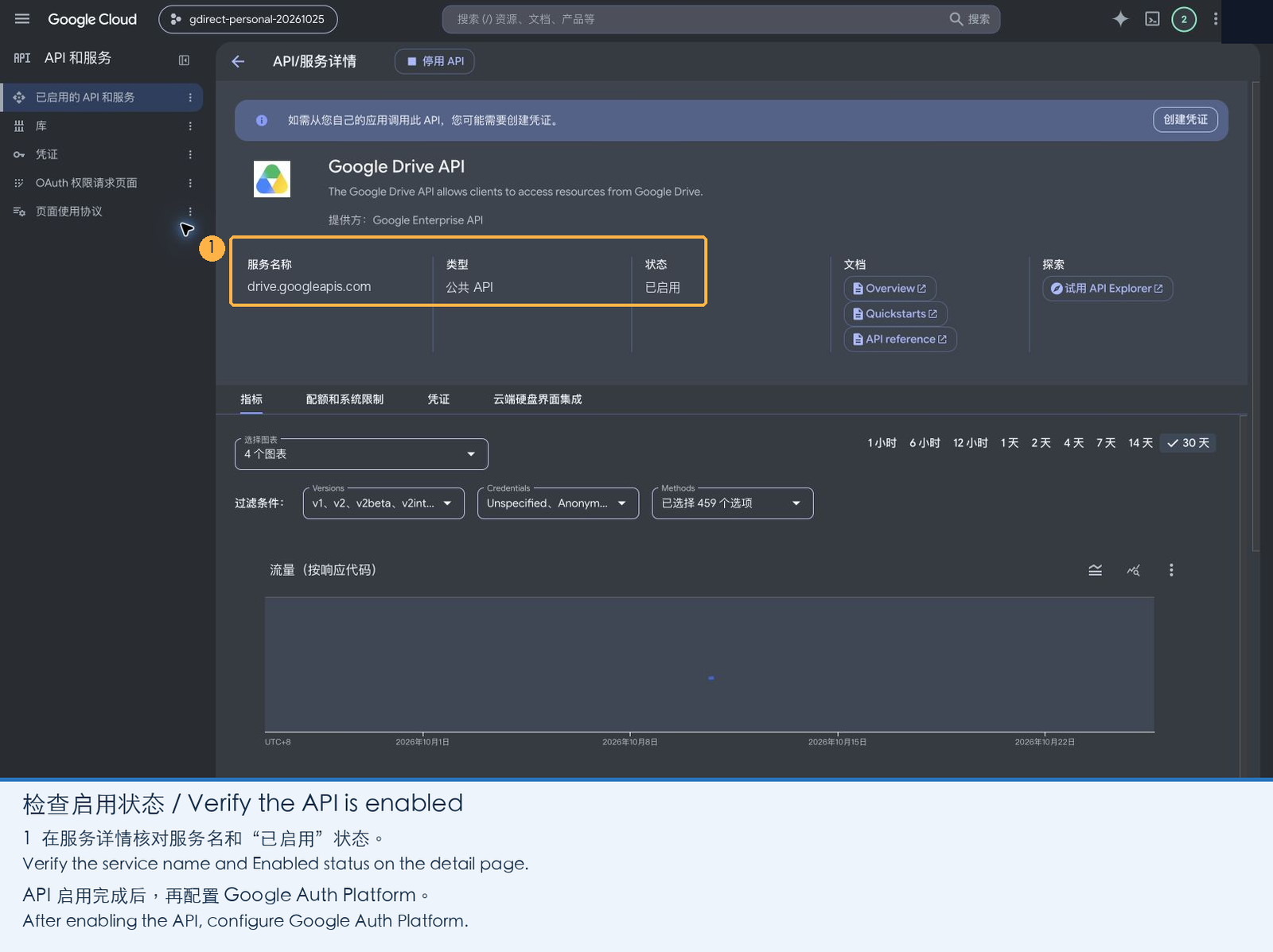
2. Configure the OAuth App
-
Open Google Auth Platform and click Get started.
-
App information: Enter an app name (e.g.
gdirect, shown on the consent screen), select your email address as the user support email, and click Next.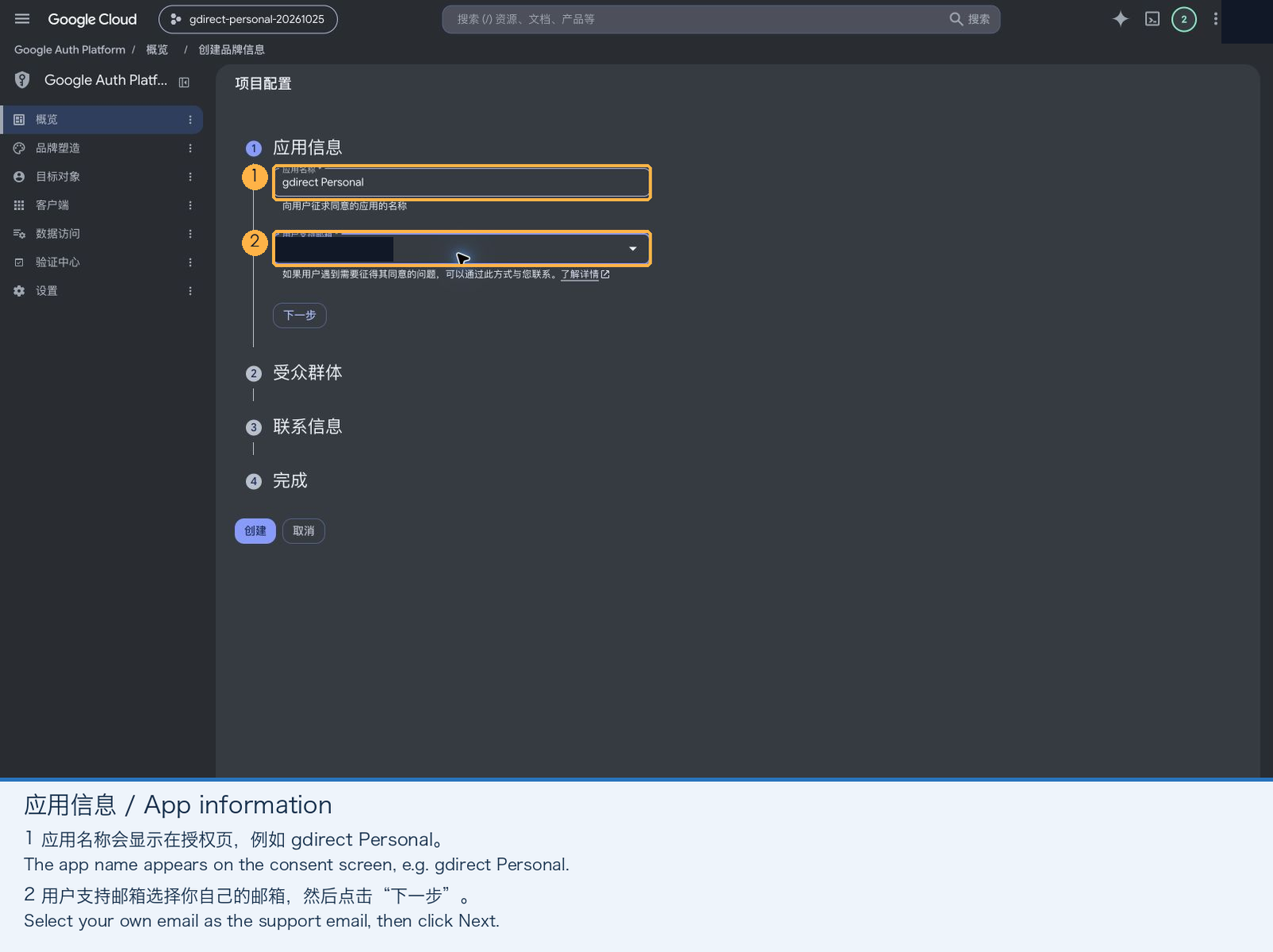
-
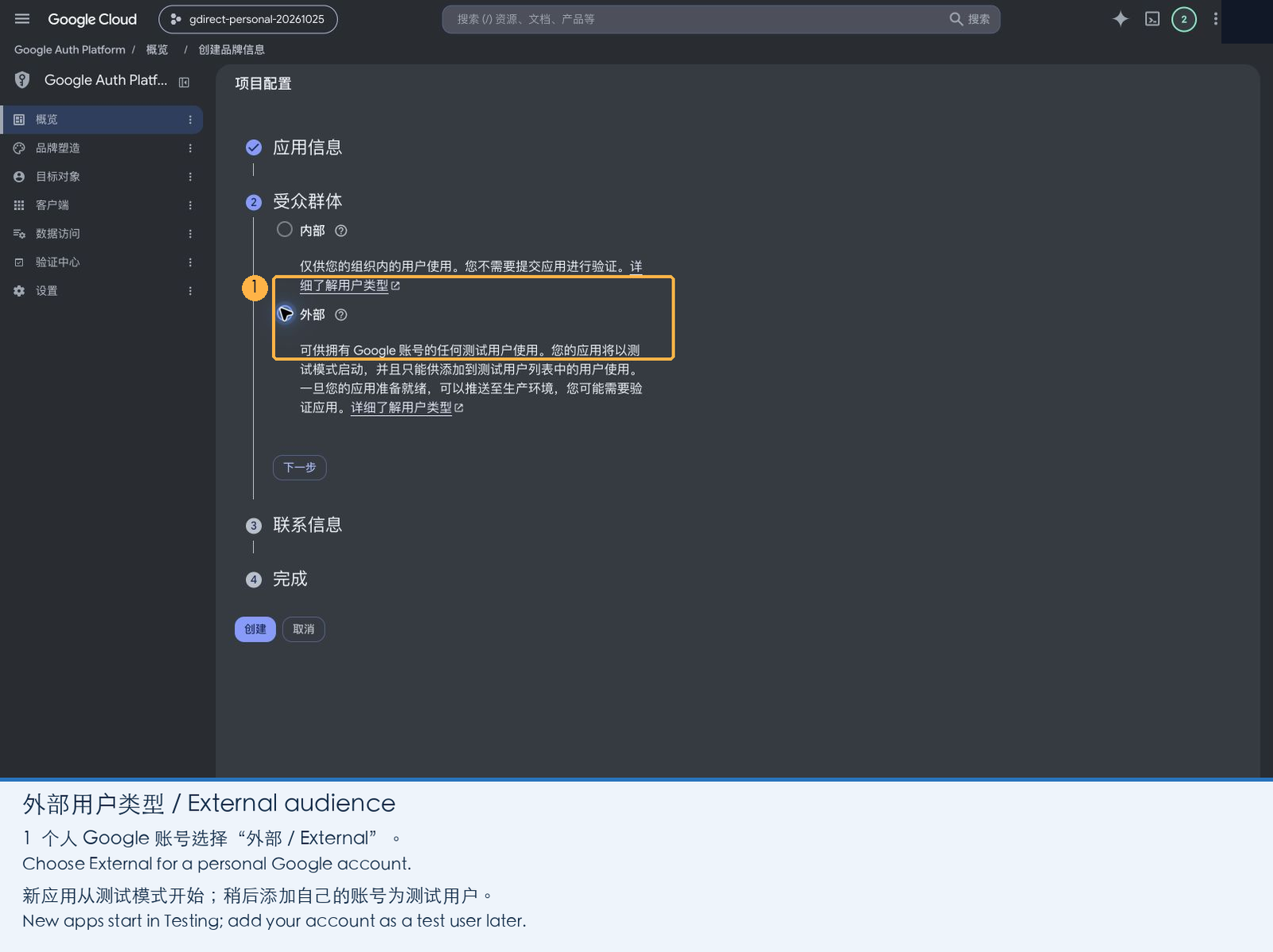
Audience: Choose External and click Next (personal accounts cannot choose Internal).
-
Contact information: Enter your email address and click Next.
-
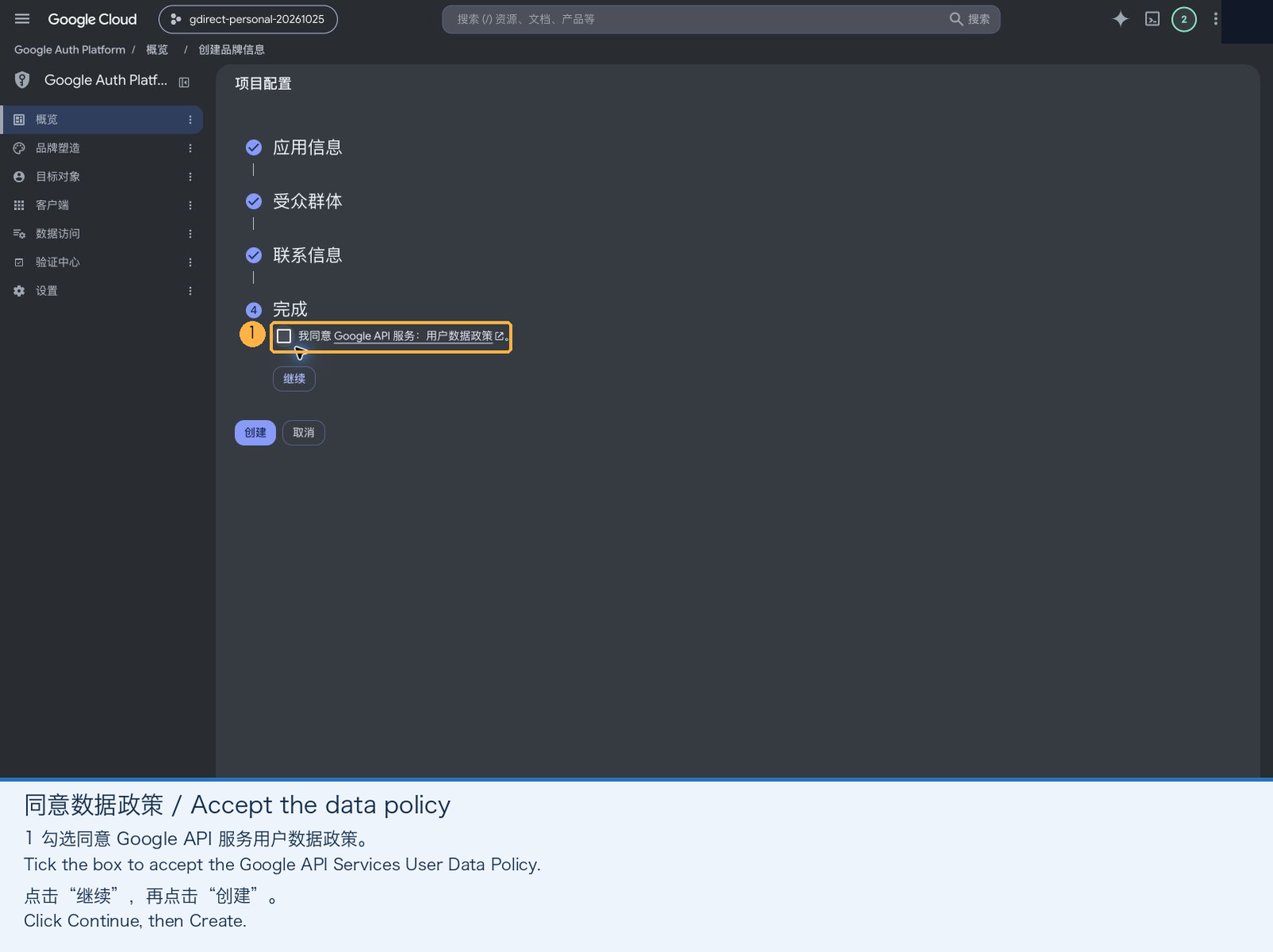
Finish: Check the box agreeing to the Google API Services User Data Policy, click Continue, and then click Create.
3. Add the Drive Scope
-
Open Data Access in the left sidebar and click Add or remove scopes.
-
In the drawer that opens, select
.../auth/drive("See, edit, create, and delete all of your Google Drive files"). If you don't see it in the table, paste the URL below into Manually add scopes, click Add to table, and then click Update:https://www.googleapis.com/auth/drive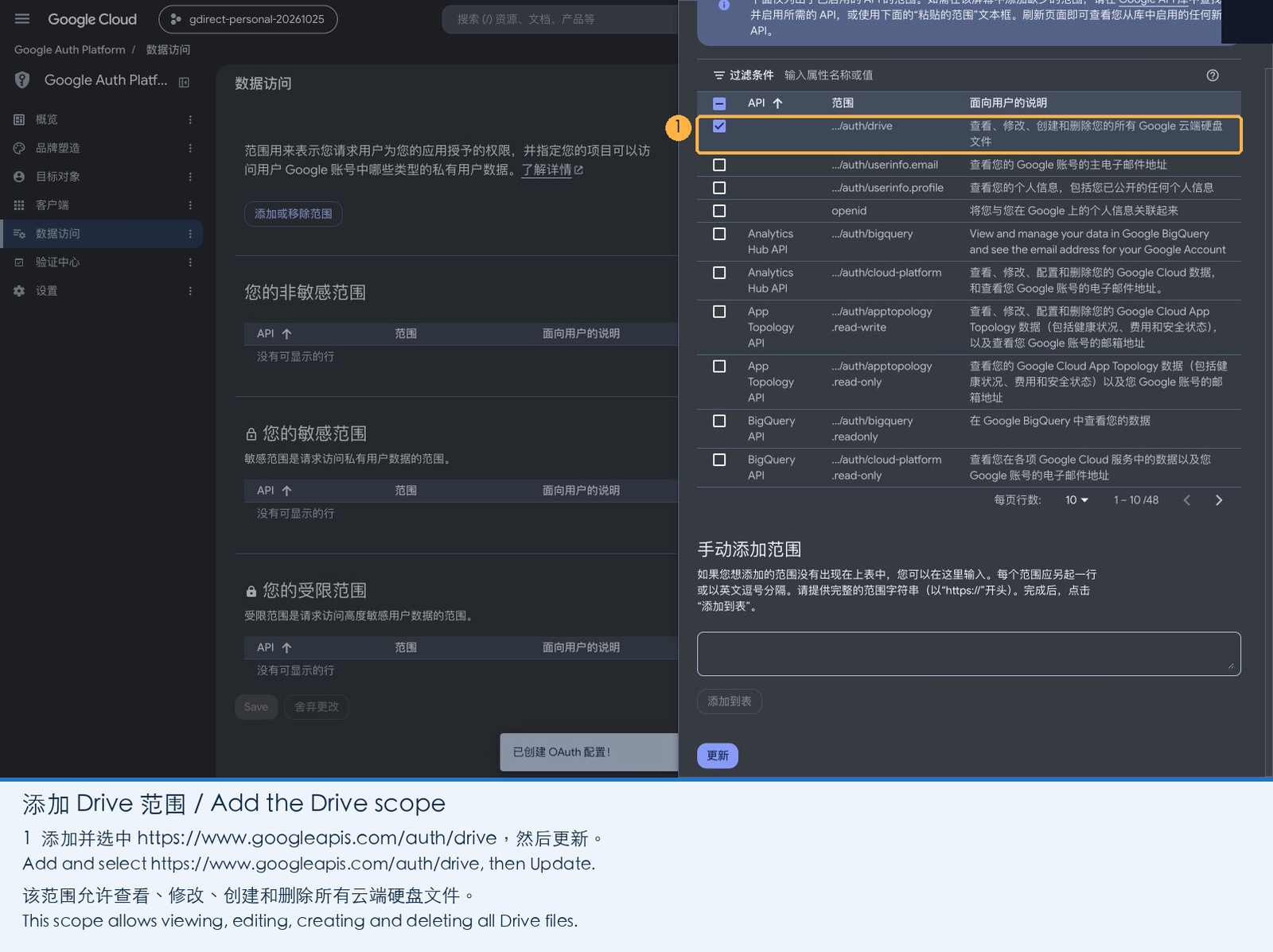
-
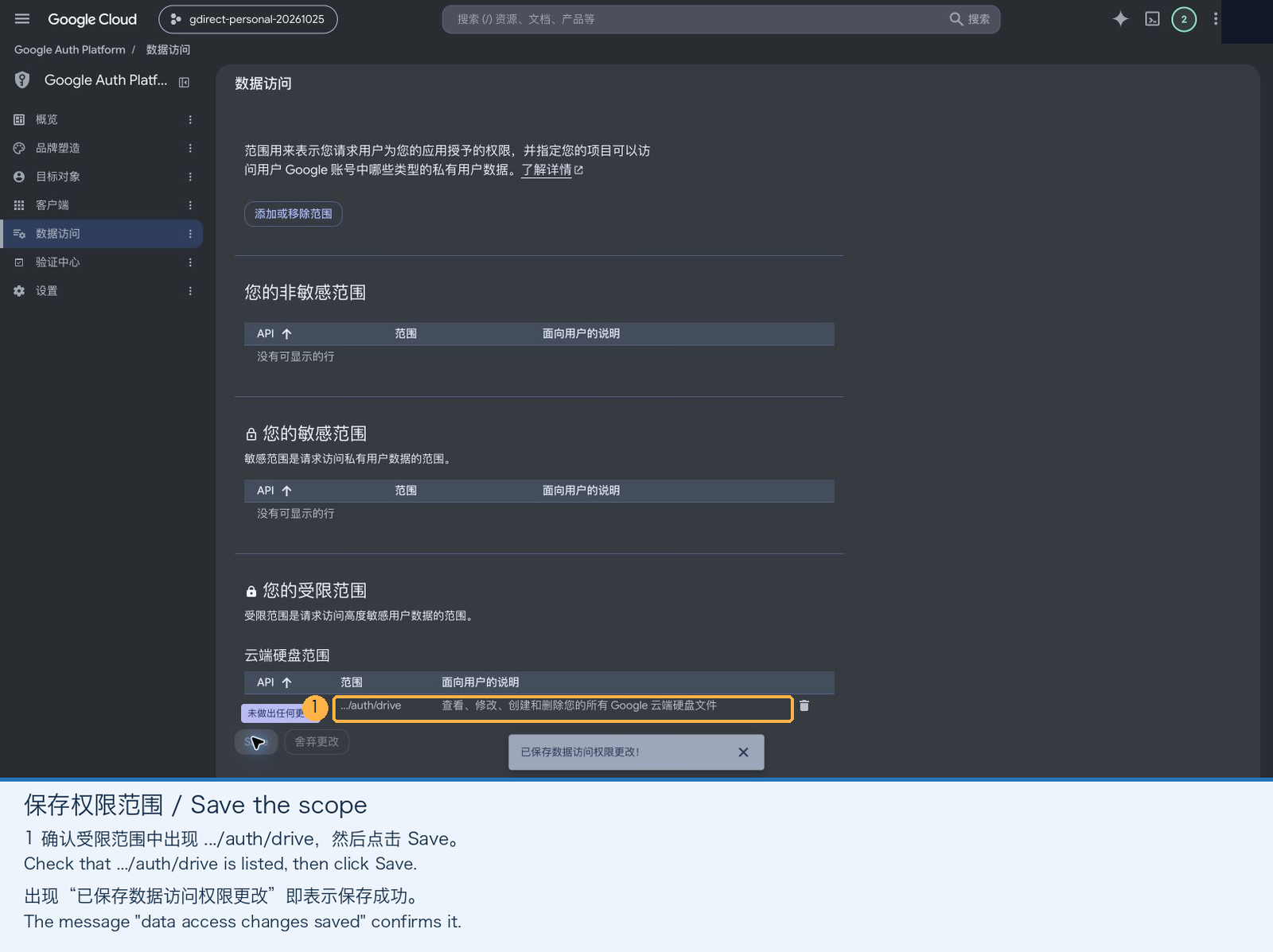
Important: After returning to the Data Access page, make sure to click Save at the bottom of the page. Clicking Update in the drawer alone does not persist the change.
4. Create a Desktop Client and Download the JSON
-
Open Clients in the left sidebar and click Create client. Set Application type to Desktop app (Web application clients, API keys, and service-account JSONs will not work), give it any name (e.g.
gdirect Desktop), and click Create.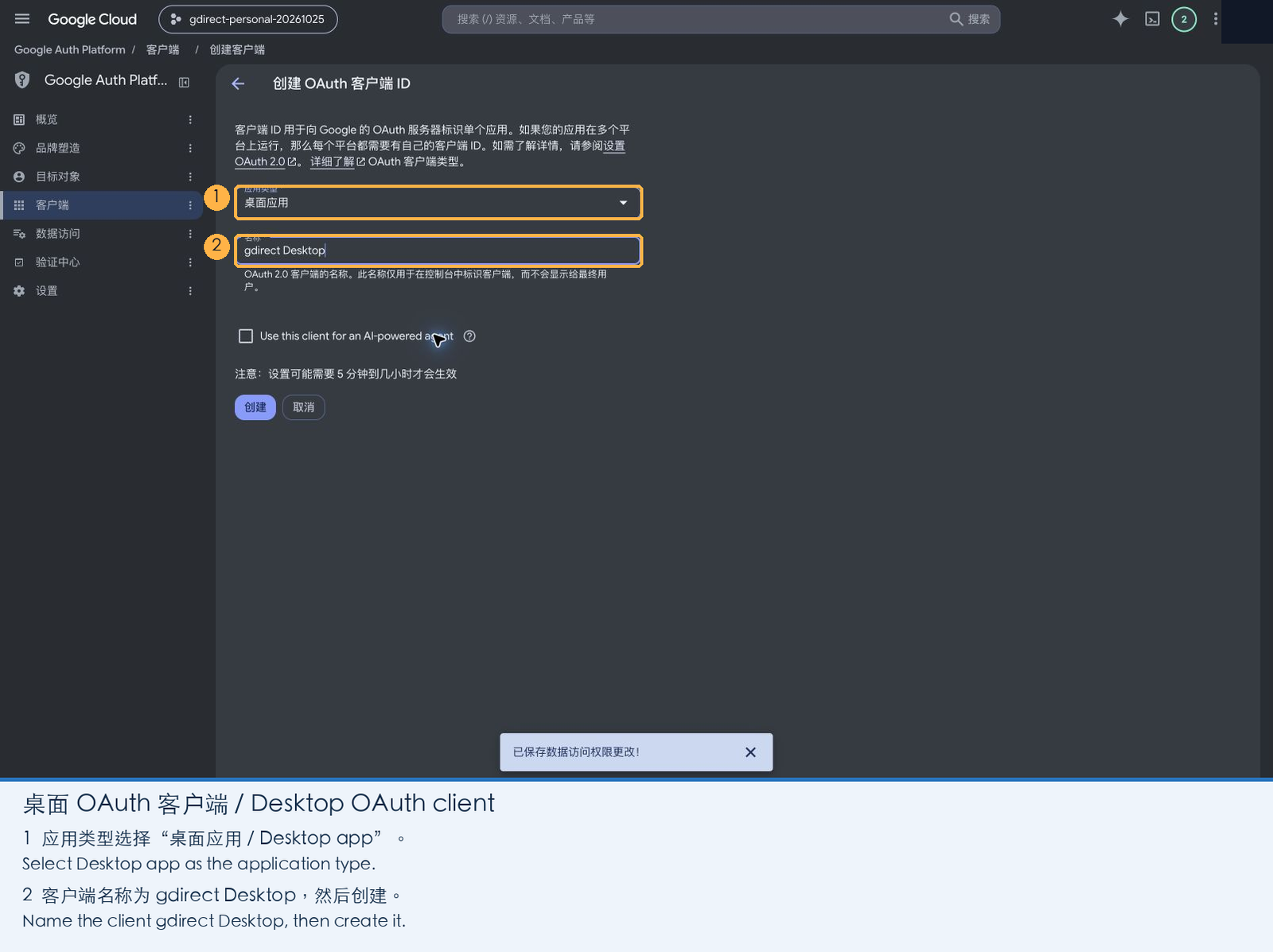
-
In the dialog that pops up, click Download JSON before closing the modal. Once closed, Google won't let you download the secret JSON again (if you close it by mistake, just create a new client).
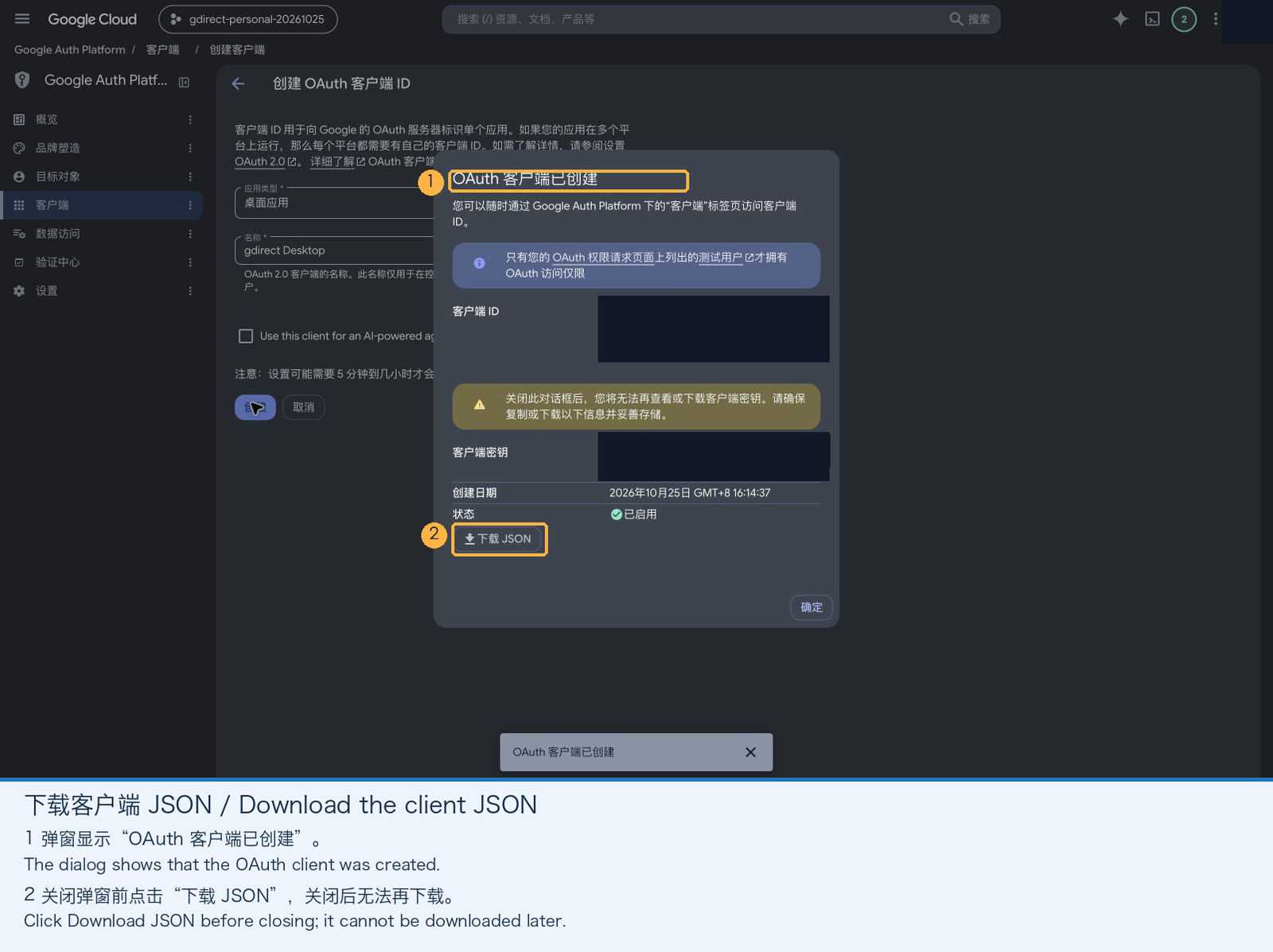
5. Allow Your Account to Sign In (and Avoid the 7-Day Expiry)
Newly created apps start in Testing mode, where only listed test users are allowed to sign in:
-
Open Audience in the left sidebar, click Add users under Test users, enter the Google account email you want to use with
gdirect, and click Save.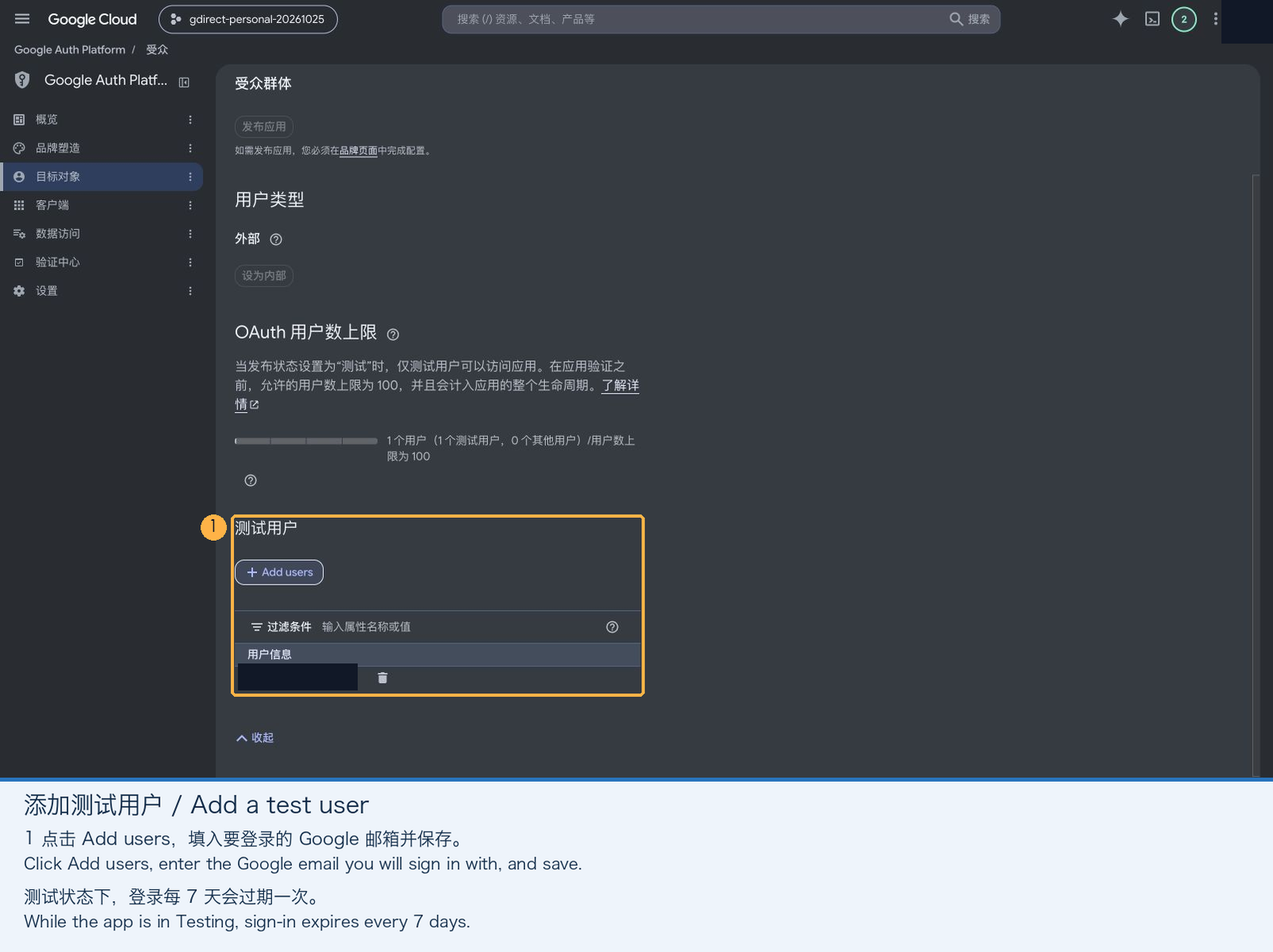
While the app stays in Testing mode, refresh tokens expire after 7 days, requiring gdirect login --reauth once a week.
If you don't want to re-authenticate every week, simply click Publish app at the top of the Audience page to switch the status to In production. A personal app used only by you does not need to go through Google's verification review, and publishing it removes the 7-day token expiration limit.
6. Log In from the Terminal
Run the command below in your terminal, replacing the path with the JSON file you downloaded:
gdirect login --client-secret ~/Downloads/client_secret.json-
Your browser will open automatically (if it doesn't, copy the URL printed in the terminal and open it in a browser on the same machine, since the OAuth flow redirects back to a temporary localhost port).
-
Choose your Google account. Google will warn that "Google hasn't verified this app"—this is completely normal because you just created it yourself:
- Testing mode: Click Continue (not "Back to safety").
- In production: Click Advanced in the bottom-left corner, then click Go to (unsafe).
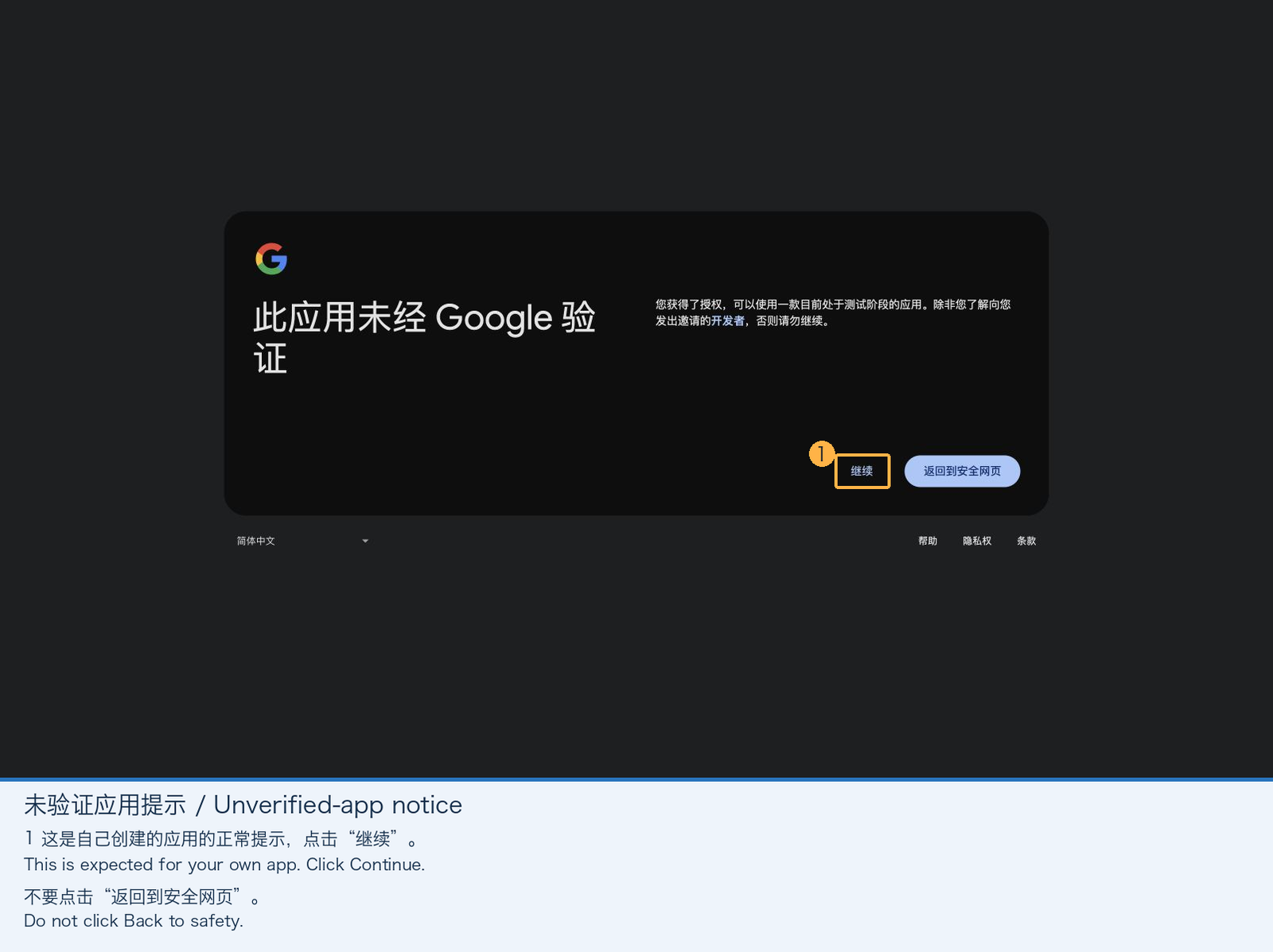
-
Verify the app name and Google Drive permission scope, then click Continue.
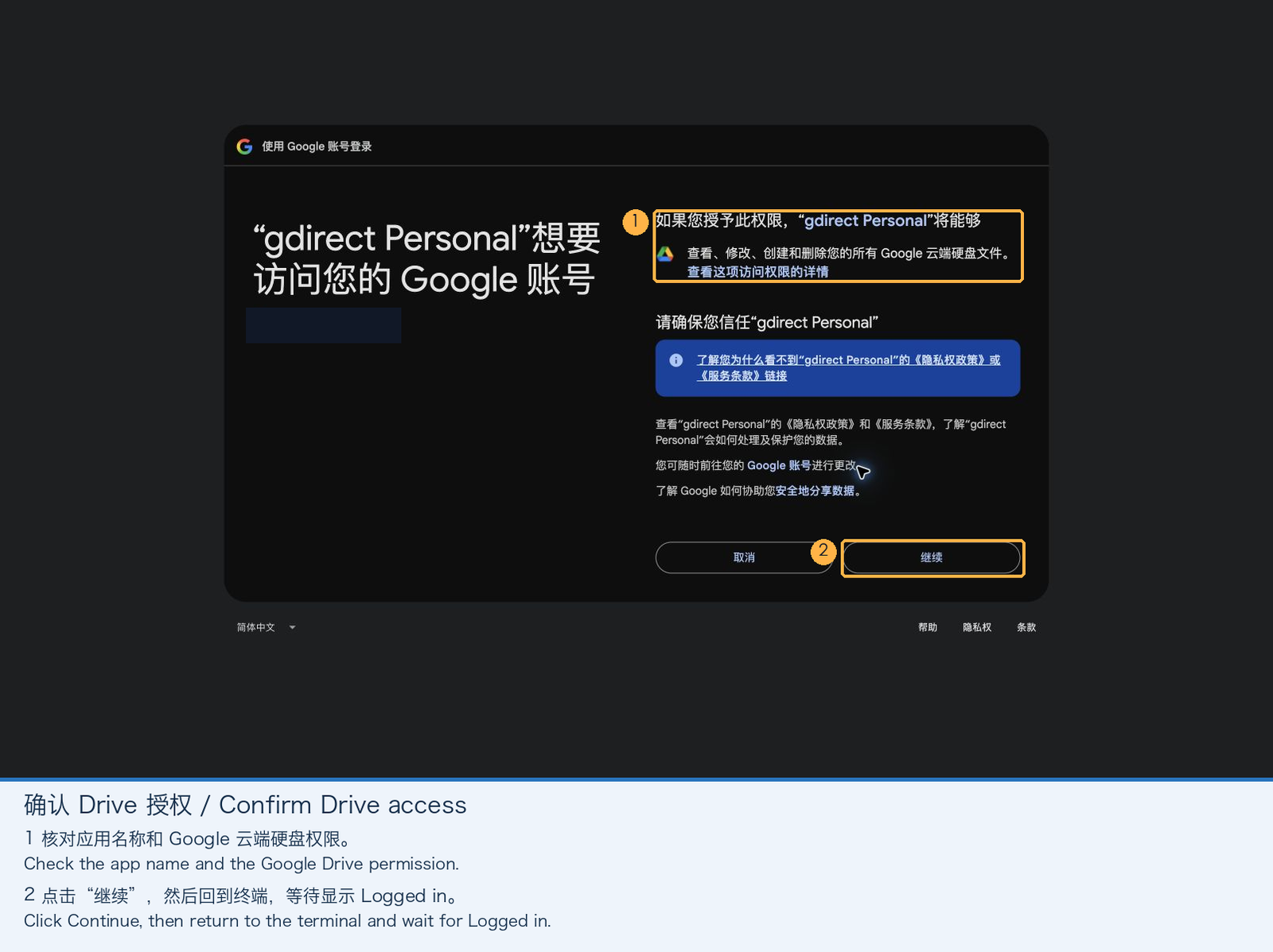
-
Back in the terminal, once you see
Logged in, you're all set. You can delete the downloaded JSON file now—the client credentials are saved inside local SQLite, and re-authenticating or switching accounts later only requiresgdirect login --reauth.
Headless Server Tip: On a remote server without a browser, you can authenticate on your desktop first, or import an existing
authorized_usercredentials JSON viagdirect login --credentials <PATH>. For scripts, you can also pass an access token directly via theGDIRECT_ACCESS_TOKENenvironment variable.
Mainland China Network and Proxy Configuration Guide
gdirect traffic comes in two kinds. Sign-in, account verification and token refresh (accounts.google.com, oauth2.googleapis.com, www.googleapis.com) must go through a proxy; scans, Drive API requests, uploads and downloads must connect directly to the scanned endpoints and must not be picked up by the proxy. How you configure your proxy client decides whether the two can each take their own path.
Since 0.8.0 (thanks to @Liuycer for #1), the easiest setup is rule mode + system proxy, with TUN off: sign-in requests read the system proxy settings, transfer requests bypass every application-level proxy anyway, so the two separate naturally and no direct rules are needed. That setup comes first below, followed by what goes wrong with TUN on and how to configure it.
Approach 1 (Recommended): Rule Mode + System Proxy, TUN Off
- Keep your proxy client (sing-box / Mihomo / Clash, etc.) in rule mode, turn on "system proxy", and turn off TUN. Make sure
accounts.google.com,oauth2.googleapis.comandwww.googleapis.comgo through the proxy (thegooglegroup in common rulesets already covers them). NoDIRECTrules are needed. - macOS and Windows:
gdirectsign-in, account verification and token refresh automatically use the manual HTTP/HTTPS system proxy. Linux, or a PAC-based system proxy: setHTTPS_PROXYfor each command, pointing at your client's HTTP or mixed port (HTTP_PROXY/HTTPS_PROXYtake precedence over system settings, andmountpasses them on to rclone;NO_PROXYmust not exclude the three domains above). Transfer commands may refresh the token too, so the simplest is toexportit in your shell. - Scans and transfers are unaffected: scans, pinned API requests, uploads and downloads explicitly bypass application proxies and connect directly to the scanned endpoints. Without TUN, the proxy client never even sees these connections, so there is nothing to hijack.
gdirect login --client-secret ~/Downloads/client_secret.json   # macOS / Windows: uses the system proxy
export HTTPS_PROXY=http://127.0.0.1:7890                        # Linux / PAC: your proxy's port
gdirect scan
gdirect download FILE_ID
gdirect --google-only download FILE_ID   # Google's own front ends only, no third-party relay
# Manual overrides still work: --sni forces a TLS identity, --no-sni omits SNI (downloads only)
gdirect download FILE_ID --no-snigdirect scan --list shows each endpoint's latency and required TLS identity, and labels anything outside Google's address space [third-party relay]. If your ISP resets connections carrying the real SNI, there is nothing to do by hand: gdirect retries under the forged g.cn identity, and moves to the next verified endpoint when the current one is gone.
You can also quit the proxy client entirely after signing in and let
gdirecttransfer directly. The access token expires after about an hour, though, and refreshing it still needs the proxy, so for long transfers keep the system proxy on.
With TUN On: How Does a Proxy Hijack Direct Traffic?
With TUN virtual network interface mode on, every packet on the machine passes through the proxy's routing engine first, and gdirect bypassing proxies at the application layer doesn't help. Let's trace what happens:
- The destination is one of Google's own overseas front ends:
At the socket layer,
gdirectswaps the destination for a scanned endpoint—usually a front end inside Google's own address space (such as142.250.x.xor192.178.x.x), or, by default, the relay183.56.143.147it tries first. So that the Google front end routes the request by hostname and local certificate verification succeeds, the TLS handshake (ClientHelloSNI) and HTTPHostheader still carrywww.googleapis.com,drive.usercontent.google.com, and*.googleusercontent.com(the SNI isg.cnunder the forged identity). - IP rules: Google's addresses go to the proxy by default:
Common rule templates contain IP rules such as
GEOIP,googleorRULE-SET,google-ipthat send Google's ranges to the proxy. That is right for a browser (most Google IPs really are unreachable in China), but it also sends the front endsgdirectworked to find—the ones that happen to be reachable—into the proxy. - Domain rules: TUN sniffing (
sniff) hijacks the connection: Whengdirectconnects to port 443 on a front end, the TUN interface intercepts the packet and usessniff(TLS SNI inspection) to readdrive.usercontent.google.comorwww.googleapis.com. In rulesets such as DustinWin/ruleset_geodata, those domains belong to the proxiedgoogleset, not the directly reachablegoogle-cnset (which lists domains likedl.google.com,g.cn, andfonts.googleapis.com):rule_set: google-cn(DIRECT) Miss;rule_set: google(PROXY) Match!- Even when an IP rule would let the destination through (the relay
183.56.143.147is a Chinese IP and matchesGEOIP,CN, for instance), domain rules come before IP rules in mainstream templates, so the sniffed Drive hostname pulls the connection back into the proxy anyway. Sign-in needswww.googleapis.comproxied, and transfers use that very same hostname: that is why the two kinds of traffic are hard to separate under TUN.
- TUN "answers" TCP for every address:
In TUN mode, the proxy accepts each connection locally and then dials the destination itself. The first step of
gdirect scan, a TCP probe, therefore "succeeds" almost everywhere, and the scan measures the proxy rather than your network. When over 90% of a batch answers,scanprints a warning asking you to route Google IPsDIRECTand scan again.
Approach 2: When TUN Must Stay On, Keep Transfers Away from Sniffing and IP Rules
If TUN has to stay on around the clock, the goal is: sign-in requests keep going through the proxy by domain, while gdirect's transfer connections go direct. There are two ways:
- Route by process (simplest on desktop): before
GEOSITE,google,GEOIP,googleand similar rules, put the proxy rules for sign-in and token refresh, thenPROCESS-NAME,gdirect,DIRECT. The catch: thewww.googleapis.comaccount check duringgdirect loginalso matches the process rule, goes direct and fails, so for the moment of signing in switch back to Approach 1 (TUN off, system proxy on) or disable the process rule temporarily. Sign-in is rare (once, for an app in production); token refresh afterwards only usesoauth2.googleapis.com, which sits above the process rule and stays proxied. - Skip sniffing for the scanned IPs: exclude the endpoints listed by
gdirect scan --listin your client's sniffing settings, and route those IPs (or all of Google's ranges) direct. Transfer connections then carry no domain, and thewww.googleapis.comproxy rule only matches sign-in. The downsides: endpoints change with each scan, and routing Google's ranges direct breaks Google services in your browser.
Note: A regular browser visiting
www.googleapis.comconnects to the blackholed IP that DNS returns, not to a scanned front end the waygdirectdoes. So don't route the Drive domains or Google's IP rangesDIRECTwholesale forgdirect; that breaks every web page and Google service in your browser that depends on them. fake-ip doesn't affect transfers either:gdirectconnects to IPs without DNS, and the only effect is that198.18.x.xfake answers seen duringscanare dropped, leaving a few fewer candidates.
For Mihomo (Clash), routing by process means adding the following before your GEOSITE,google, GEOIP,google and similar rules:
rules:
  # 1. Sign-in and token refresh go through the proxy (must come before the process rule)
  - DOMAIN,accounts.google.com,PROXY
  - DOMAIN,oauth2.googleapis.com,PROXY

  # 2. Everything else from the gdirect process (scan, API, download, upload) goes DIRECT,
  #    so sniffed domain rules and Google IP rules don't hijack it.
  #    For gdirect login, turn TUN off and use the system proxy, or disable this rule
- PROCESS-NAME,gdirect,DIRECTIf you use sing-box, likewise put a proxy rule for oauth2.googleapis.com and then a process_name: gdirect direct rule before rule_set: ["google"] and any Google IP rules in route.rules.
Daily Usage & Troubleshooting Reference
Common Commands
gdirect                                   # Same as `gdirect browse`, opens the interactive TUI
gdirect browse -o ~/Downloads             # Set download directory (defaults to ./downloads)
gdirect ls root --json                    # List directory contents (supports JSON output)
gdirect download <FILE_ID_OR_SHARE_URL>   # Download a file; re-run the same command to resume after interruption
gdirect download FILE_ID -o file.zip
gdirect download DOC_ID --export application/pdf -o doc.pdf
gdirect upload ./file.zip                 # 32 MiB chunked upload with automatic resume
gdirect upload ./file.zip --parent FOLDER_ID --name backup.zip
gdirect mount                             # Mount at ~/GoogleDrive (uses native NFS on macOS, no FUSE needed)
gdirect unmount                           # Unmount and clean up temporary exported credentials
gdirect scan # Scan again; scan --list shows the resultsSince 0.6.0, several Google accounts can share one OAuth client:
gdirect login --add                       # Sign in another account in the browser
gdirect accounts                          # List accounts; * marks the default
gdirect switch work                       # Make work@… the default
gdirect -a me@gmail.com browse # Use one account for a single command (or set GDIRECT_ACCOUNT)The browse TUI uses a yazi-style three-column layout showing the parent folder, the current folder and a preview side by side, with multi-select, whole-folder downloads and file operations in Drive. Press ? for every key:
| Key | Action |
|---|---|
j / k, ↑ / ↓ |
Select |
g / G, Home/End |
First / last item |
Ctrl-d / Ctrl-u, PgDn/PgUp |
Half a page / a page down or up |
Enter, l / → |
Open folder |
h / ←, Backspace |
Parent folder |
/ |
Filter the current folder by name. Enter keeps the filter, Esc clears it |
Ctrl-r, F5 |
Refresh |
| Space | Mark or unmark an item; marks are kept when you change folders |
Ctrl-a |
Mark everything shown (press again to unmark) |
| Esc | Clear the filter, then the marks, then the clipboard |
a |
Create an empty file; a name ending in / creates a folder |
r |
Rename |
y / x |
Copy / cut the marked items (or the selected one) |
p |
Paste into the current folder. Cut items are moved; copied files are duplicated |
D, Delete |
Move the marked items to the Drive trash (asks first) |
u |
Upload a local file into the current folder |
d |
Queue the marked items for download. A folder is downloaded with all its subfolders; Google Docs, Sheets and Slides are exported as PDF |
+ / - |
Connections for the next download (1–16), saved as your default |
c |
Cancel the current download and keep the partial data |
R |
Retry failed or cancelled downloads |
X |
Remove downloads that have not started yet |
q |
Quit |
Downloads run one at a time; the file list shows each file's state (queued, downloading, saved, failed), and selecting a failed file shows the full error.
For tricky network environments, there are transport-layer overrides:
--google-only(global; orGDIRECT_GOOGLE_ONLY=1): use no third-party relay; scans and transfers use only endpoints inside Google's published address space;--ip IP: force a specific IP, skipping scan results and failover;--sni HOST/--no-sni: force a TLS identity, or omit SNI altogether (--snialso works forlsandupload;--no-sniis download-only). Without them, gdirect uses the scanned identity and falls back automatically;--ca-cert FILE: use this CA bundle instead of the embedded Google GTS roots;-j N: set concurrent connections (1–16) for this command only;gdirect scan --ips FILE: probe a custom candidate list (one public IP per line,#for comments). Addresses there are not limited to Google's space, but those outside it are labelled[third-party relay], and--google-onlykeeps transfers off them.
Troubleshooting Quick Reference
| Symptom | Fix |
|---|---|
access_denied or message that the app is being tested |
Add your Google account as a Test user, or publish the app (Step 5 of the setup guide) |
redirect_uri_mismatch |
The downloaded JSON is not from a Desktop app client; recreate it following Step 4 |
Drive API 403 … insufficient permission |
Enable the Google Drive API in the same project as your OAuth client (Step 1), save the Drive scope (click Save at the bottom in Step 3), then run gdirect login --reauth |
refresh credential expired or revoked |
Run gdirect login --reauth. If this happens every 7 days, publish the app from Testing to In production (Step 5) |
scan warns almost every address answered TCP |
A TUN proxy is answering for every address, so the scan measured the proxy. Turn TUN off as described above, or route the gdirect process / Google IPs DIRECT, then scan again |
no usable Google front end found |
No usable endpoint was found from this network. Rule out a TUN proxy first; otherwise scan again later (reachable front ends change), or supply candidates with gdirect scan --ips FILE |
libaria2 code 1 mid-download (connection or TLS failure) |
The real SNI was reset or the endpoint died. gdirect retries under g.cn, then resumes on the next verified endpoint and marks the dead one; it only fails once every endpoint has, and re-running the command rescans. --sni g.cn / --no-sni still work by hand |
cannot verify the account or cannot reach Google's token endpoint during sign-in |
Sign-in, account verification or token refresh didn't go through the proxy. Make sure your client's system proxy is on and accounts.google.com, oauth2.googleapis.com and www.googleapis.com are proxied; set HTTPS_PROXY on Linux or with PAC; with TUN and a process rule, turn TUN off for the moment of signing in (see Approach 2) |
An IP in scan --list shows [third-party relay] |
The address is outside Google's published space: a third-party relay, such as 183.56.143.147, which is tried first by default. It cannot read your traffic but sees your IP; use --google-only if that matters to you |
Correction and Improvements: 183.56.143.147 Is Not Google
After the first version of this post went out, a reader, Ken, emailed to point out several factual errors: 183.56.143.147 is not a Google server; the google-cn nodes inside China will not fetch Drive for you; and "GFE" is not a kind of IP or server. We spent a day checking each point, and he was right on all of them. This section lays out how we checked, what changed, and where the new approach falls short. Thank you, Ken, for reading carefully and taking the time to write.
What the First Version Got Wrong
The first version claimed that 183.56.143.147 was a Google google-cn edge node on China Telecom in Guangzhou; that these domestic nodes ran Google's front end (GFE) and reached Drive's backends over Google's internal network; and that connecting to it therefore kept traffic from "physically crossing the firewall". The scan also used it as its built-in seed.
The IP came from the Cealing-Host list used by Sheas-Cealer, where every Google entry points at the same address. It presents Google's genuine certificate and the Drive API answers normally through it; we took that as proof it was Google and never checked who actually runs it.
Check 1: Who Does Google See as the Client?
Google has a diagnostic endpoint, https://redirector.googlevideo.com/report_mapping?di=no, that reports the client IP it sees. Testing from a China Unicom line in Shanghai (bound to the physical interface to bypass the local VPN):
- A direct request: Google reports our own IP;
- Through
183.56.143.147: Google reports122.10.103.81, an address in Hong Kong (AS136897, Enjoyvc).
So the connection enters Google from Hong Kong. whois shows 183.56.143.147 belongs to CHINANET Guangdong, and neither it nor 122.10.103.81 is in Google's published ranges (goog.json). Conclusion: it is a third-party TCP relay (reverse proxy) that forwards traffic to Hong Kong and on to Google.
It doesn't touch TLS; it just forwards the byte stream, so the client sees Google's genuine GTS certificate and gdirect verifies it against Google's GTS roots as usual. That means:
- The relay cannot see: access tokens, file contents or request paths, all of which stay inside end-to-end TLS; nor can it forge a certificate to intercept.
- The relay can see: your IP, traffic volume and timing; and, unless the forged identity is used, the hostname in the TLS SNI (e.g.
www.googleapis.com). Under theg.cnidentity, it only sees a connection tog.cn.
Check 2: Can the Genuine Google Nodes in China Serve Drive?
Google does have nodes in China, just not the kind the first version described. We tested two groups:
203.208.40.x/203.208.41.x, registered to GOOGLECN (Beijing Gu Xiang, Google's China entity);- Google cache nodes inside ISP networks, such as
211.95.34.xinside China Unicom Shanghai, which domestic DNS returns fordl.google.com,fonts.googleapis.com,g.cnandwww.gstatic.com.
Both accept TCP and TLS and present Google certificates. Requesting each service by Host header makes the picture clear:
| Requested host | Result |
|---|---|
www.google.cn, fonts.googleapis.com |
200 |
www.gstatic.com/ipranges/goog.json |
200 |
www.googleapis.com/drive/v3/… |
404 |
oauth2.googleapis.com |
404 |
drive.usercontent.google.com |
404 |
They serve a whitelist, and Drive is not on it. The path "domestic node, then Google's internal network, then Drive" does not exist. (They do serve Google's IP range lists, which comes in handy later.)
Check 3: Other Intuitive Candidates
- The Google IPs domestic DNS returns for
www.googleapis.comanddrive.usercontent.google.com(74.125.x,172.217.x,142.250.157.xand so on) are real, but TCP times out: they are blackholed. - DNS for
drive.google.comis poisoned; the answers (69.63.184.30,128.242.240.59) are not Google at all. - Firebase Hosting and Google Cloud load-balancer IPs present their customers' certificates and cannot be used for Google APIs.
- One Cloud Storage IP (
142.250.73.123) was reachable, but it is a GCS-only front end that answers everyHostas GCS.
Check 4: Sweeping Google's Own Front Ends
If every IP that DNS hands out is blocked, what about the ones it doesn't? Google publishes all of its ranges (goog.json) and the part leased to Cloud customers (cloud.json); the difference is Google's own service space. We swept the blocks where front ends concentrate (142.250.0.0/15, 172.217.0.0/16, 172.253.0.0/16, 173.194.0.0/16, 74.125.0.0/16, 192.178.0.0/15, 64.233.160.0/19, 66.102.0.0/20, 108.177.0.0/17, 209.85.128.0/17, 216.58.192.0/19, 216.239.32.0/19, 108.170.192.0/18, 72.14.192.0/18): about 2,500 /24s, 12 host numbers each (.4 .14 .91 .100 .113 .123 .132 .138 .155 .187 .207 .219). For each address: TCP 443 first; for those that answered, a full check under both the real SNI and g.cn—an unauthenticated Drive API request had to return the expected 401 JSON, and a public test file had to download correctly.
Funnel~2,500 /24s × 12 host numbers
- Addresses probed
- 30528
- Answered TCP 443
- 1423
- 4.7%
- Fully working
- +104
- Drive API + test download passed
- Spread
- ~65 /24s
- clustered; 192.179.50/60/61 had 7 each
Performancefrom the same Unicom line
- TCP connect
- 268 ms
- p50; p90 was 511 ms
- Single-connection download
- 4–6 MB/s
- 27 MB file, Host dl.google.com
Every working address passed under both the real SNI and the forged g.cn identity.
| Reason | Count |
|---|---|
| Certificate mismatch | ~1030 |
| TLS timeout or reset | ~290 |
Certificate mismatches were mostly Cloud Storage-only front ends; TLS timeouts and resets may be SNI-based interference.
The host numbers show a clear pattern: .187, .207 and .219 never worked (all Cloud Storage-only front ends), while .100, .113, .155, .132, .138 and .91 worked best.
Are they really Google, and really direct? Three pieces of evidence: every address is in goog.json; whois says Google LLC; and traceroute from the Unicom line goes straight into Google's backbone (142.251.x, 192.178.x, 172.253.x) with no third party in between.
Why aren't they blocked? Our guess: domestic DNS never hands them out, so they haven't made it onto the blocklist. That also means they may be blocked as soon as usage grows—which is exactly why gdirect discovers them dynamically instead of shipping a fixed list.
A Note on Terminology: What GFE Is
The first version used "GFE" as if it were a category of node, which is inaccurate. Google's servers come in kinds such as GWS (Google Web Server), GVS (video servers) and GGC (Google Global Cache nodes inside ISP networks); the Google Front End (GFE) is a component of Google's infrastructure that the Google security whitepaper describes as terminating TLS, providing DDoS protection and load balancing before handing requests to backend services. This post now uses "GFE" only in that sense: Google's front-end serving layer, which routes requests by Host. It is not an IP category. "Google front end" in this post means a server in Google's own address space served by that layer.
What Changed in gdirect 0.7.0 / 0.8.0
- Google's address space, embedded and refreshed weekly (0.7.0;
src/ranges.rs,src/google-ranges.txt,scripts/update-ranges.py): a snapshot of goog.json minus cloud.json ships in the binary and is refreshed weekly at scan time. The refresh goes over the system network first—in China,www.gstatic.comresolves to exactly the kind of in-ISP Google cache above, which serves the range lists—and through a verified endpoint otherwise. Lists that look truncated are rejected. - The scan became a front-end sweep (0.7.0;
src/scan.rs): candidates come only from inside Google's space: earlier verified endpoints, DNS answers (poisoned ones fall outside and are dropped), the /24s where our sweep found working front ends (src/frontend-seeds.txt), then the core front-end blocks, then everything else, each part shuffled per user. Only the productive host numbers are tried. Each batch of 2,048 addresses gets a TCP probe, then full verification of what answered; when one works, the rest of its /24 goes next; the sweep stops at 8 verified endpoints. It warns when nearly everything answers TCP (a TUN proxy intercepting). - Failover (0.7.0;
Api::deliverand downloads): when the current endpoint stops answering, gdirect tries the other TLS identity, then each other endpoint verified within the last day; downloads resume on the new endpoint. - The relay: 0.7.0 dropped
183.56.143.147from the scan and purged it from existing databases once. In practice the relay is fast and stable, so 0.8.0 tries it first by default and falls back to the scanned Google front ends when it fails, and the 0.7.0 purge is gone. It also adds a global--google-onlyoption (environment variableGDIRECT_GOOGLE_ONLY=1): the scan skips relays and transfers use only endpoints inside Google's space. Either way, endpoints outside Google's space are labelled[third-party relay]inscanandscan --list. - Sign-in through the system proxy (0.8.0, #1 contributed by @Liuycer): sign-in, account verification and token refresh use the macOS / Windows HTTP/HTTPS system proxy (and
HTTPS_PROXY), so a rule-mode proxy client with TUN off is enough to sign in; scans, pinned API requests, uploads and downloads still connect directly.
Which to choose: the relay cannot read your tokens or files, but its operator—whom we don't know—sees your IP, traffic volume and timing, and (without the forged identity) which Google host you connect to. If that bothers you, use --google-only; you can also force the forged identity with --sni g.cn so the relay doesn't even see the hostname.
Why We Don't Bundle Reverse Proxies Found Online
Search engines for internet-facing hosts such as fofa turn up plenty of reverse proxies presenting Google certificates, and someone suggested bundling a batch of them. We didn't: most are someone else's misconfigured servers, accidentally left open, and using them en masse without permission is freeloading on other people's machines and bandwidth; their operators see every user's IP and access times; and such servers tend to be shut down or blocked quickly, so a bundled list goes stale fast. 183.56.143.147 is a relay a public list has used for a long time; we label it clearly as third-party, try it first by default, and let you turn it off with --google-only. Beyond that, gdirect doesn't seek out any third-party server. Candidates you find yourself can still be tested with gdirect scan --ips FILE, and anything outside Google's space is labelled the same way.
Limits
- All of the results above come from one line (China Unicom Shanghai), one location, one day (2026-10-26). China Telecom, China Mobile and other regions are unverified; the reachable front ends there may be entirely different, or there may be none.
- These front ends are probably reachable only because nobody has noticed them yet. They may be blocked at any time; when that happens
gdirectcan only rescan for others, and if it finds none, fall back to the relay or a proxy. - 4–6 MB/s per connection with a p50 connect time of 268 ms is what you'd expect from a direct cross-border link, not "saturating your broadband". Multiple connections help, depending on the line.
If you test from another ISP or region, I'd love to hear the results, whether or not it works.
Technical Deep Dive: How Is It Implemented Under the Hood?
If you're curious about how gdirect combines Rust with a custom-patched libaria2 build to pull this off, here is a walkthrough of the source code.
1. Where Candidates Come From: Google's Own Address Space and the Sweep Order
When a transfer command runs without an endpoint verified in the last 24 hours in local SQLite, src/scan.rs starts a scan. By default 0.8.0 probes the known relay 183.56.143.147 first (skipped under --google-only), then sweeps Google's front ends anyway, as backups for when the relay fails:
336        if !google_only {
337            let relays: Vec<IpAddr> = RELAYS.iter().filter_map(|r| r.parse().ok()).collect();
338            eprintln!("Checking known relays (not Google; use --google-only to skip)…");
339            record(
340                db,
341                &google,
342                verify(&relays, usize::MAX),
343                |_| true,
344                &mut warned,
345            )?;
346        }
There is exactly one relay, hard-coded in RELAYS with a comment stating it is not Google. For transfers, usable sets the order of endpoints: the relay first, the rest by latency; --google-only drops every endpoint outside Google's space, including ones you added by hand with scan --ips:
32/// Known third-party relays that forward to Google. Not Google: the operator
33/// sees client IPs and, without the forged identity, the hostname, but TLS
34/// stays end to end and is verified against Google's roots. They are fast and
35/// stable in mainland China, so they are tried first unless --google-only.
36const RELAYS: [&str; 1] = ["183.56.143.147"];
37fn relay(ip: IpAddr) -> bool {
38    RELAYS.iter().any(|r| r.parse() == Ok(ip))
39}
40/// Endpoints in the order transfers should use them: known relays first
41/// (unless `google_only`, which drops everything outside Google's space),
42/// then the rest as given (fastest first).
43pub fn usable(
44    routes: Vec<crate::store::Route>,
45    google: &Ranges,
46    google_only: bool,
47) -> Vec<crate::store::Route> {
48    let mut routes: Vec<_> = routes
49        .into_iter()
50        .filter(|r| !google_only || google.contains(r.ip))
51        .collect();
52    routes.sort_by_key(|r| !relay(r.ip));
53    routes
54}194fn direct_route(db: &store::Store, route: &Route, google_only: bool) -> Result<Direct> {
195 let explicit = route.sni();
196 let auto = explicit.is_none();
197 if let Some(ip) = route.ip {
198 return Ok(Direct {
199 ip,
200 sni: explicit,
201 auto,
202 backups: Vec::new(),
203 });
204 }
205 let google = ranges::current(db);
206 let mut routes = scan::usable(db.routes(16)?, &google, google_only);
207 if routes.is_empty() {
208 scan::run(db, None, google_only)?;
209 routes = scan::usable(db.routes(16)?, &google, google_only);
210 }
211 let identity = |sni: String| (!sni.is_empty()).then_some(sni);
212 let mut routes = routes.into_iter().map(|r| (r.ip, identity(r.sni)));
213 let (ip, stored) = routes.next().context("no verified endpoint")?;
214 Ok(Direct {
215 ip,
216 sni: explicit.or(stored),
217 auto,
218 backups: routes.take(8).collect(),
219 })
220}The front-end sweep code below is from 0.7.0; it is unchanged in 0.8.0.
The sweep is bounded by Google's own address space in src/ranges.rs: goog.json lists every address Google owns, cloud.json the part that can be assigned to Google Cloud customers, and the difference is where Google's own services live. A snapshot is embedded and refreshed weekly from www.gstatic.com; a list that comes back implausibly small (truncated or tampered with) is rejected in favour of the old one:
128    /// Google's own space from the published feeds: everything Google owns
129    /// minus what Google Cloud customers can be assigned.
130    pub fn from_feeds(goog: &str, cloud: &str) -> Result<Self> {
131        let list = |json: &str| -> Result<Self> {
132            let data: serde_json::Value = serde_json::from_str(json)?;
133            let prefixes = data["prefixes"]
134                .as_array()
135                .context("IP range feed has no prefixes")?;
136            Self::from_prefixes(
137                prefixes
138                    .iter()
139                    .filter_map(|p| p["ipv4Prefix"].as_str().or(p["ipv6Prefix"].as_str())),
140            )
141        };
142        let (goog, cloud) = (list(goog)?, list(cloud)?);
143        let ranges = Self {
144            v4: subtract(&goog.v4, &cloud.v4),
145            v6: subtract(&goog.v6, &cloud.v6),
146        };
147        // A truncated or hostile feed must not shrink the trusted space to nothing.
148        ensure!(ranges.v4.len() >= 16, "IP range feed looks incomplete");
149        Ok(ranges)
150    }
Candidates are queued by priority, and only addresses inside Google's space are accepted: earlier verified endpoints and DNS answers first (poisoned answers fall outside the space and are dropped), then the /24s where our sweep found working front ends (src/frontend-seeds.txt, 67 of them), then the core front-end blocks, and finally everything else. Each part is shuffled per user so everyone doesn't pile onto the same few front ends:
96/// Sweep order: earlier verified endpoints, DNS answers, seed /24s, then
97/// Google's core front-end blocks and finally the rest of its space, each
98/// shuffled. Only addresses inside `google` are ever considered.
99fn plan(
100    google: &Ranges,
101    known: &[IpAddr],
102    dns: &[IpAddr],
103    shuffle: &mut Shuffle,
104) -> VecDeque<IpAddr> {
105    let core = Ranges::parse(&CORE.replace(' ', "\n")).expect("core blocks must parse");
106    let seeds = Ranges::parse(SEEDS).expect("seed list must parse");
107    let mut seen = HashSet::new();
108    let mut order = VecDeque::new();
109    let mut add = |ip: IpAddr, order: &mut VecDeque<IpAddr>| {
110        if public(ip) && google.contains(ip) && seen.insert(ip) {
111            order.push_back(ip);
112        }
113    };
114    for &ip in known.iter().chain(dns) {
115        add(ip, &mut order);
116    }
117    let mut seed_nets: Vec<u32> = seeds.slash24s().collect();
118    shuffle.apply(&mut seed_nets);
119    let (mut core_nets, mut rest_nets): (Vec<u32>, Vec<u32>) = google
120        .slash24s()
121        .filter(|n| !seeds.contains(IpAddr::V4(Ipv4Addr::from(*n))))
122        .partition(|n| core.contains(IpAddr::V4(Ipv4Addr::from(*n))));
123    shuffle.apply(&mut core_nets);
124    shuffle.apply(&mut rest_nets);
125    for net in seed_nets.into_iter().chain(core_nets).chain(rest_nets) {
126        for ip in hosts(net) {
127            add(ip, &mut order);
128        }
129    }
130    order
131}
Only 7 host numbers per /24 are tried, based on the statistics from the sweep above: .187, .207 and .219 never worked (all Cloud Storage-only front ends), so they are skipped:
16const LIMIT: usize = 256;
17/// Verified endpoints to collect before a sweep stops.
18const TARGET: usize = 8;
19/// Upper bound on TCP probes in one sweep.
20const MAX_PROBES: usize = 60_000;
21/// Addresses swept per batch: TCP first, then full verification of what answered.
22const BATCH: usize = 2048;
23const TCP_WORKERS: usize = 256;
24const TCP_TIMEOUT: Duration = Duration::from_secs(2);
25/// Host numbers inside a /24 where Google's general front ends answer. .187,
26/// .207 and .219 are Cloud Storage-only front ends and never serve Drive.
27const OFFSETS: [u8; 7] = [100, 113, 155, 132, 138, 91, 123];
28/// Blocks that hold most of Google's general front ends; swept before the
29/// rest of Google's space.
30const CORE: &str = "142.250.0.0/15 172.217.0.0/16 172.253.0.0/16 173.194.0.0/16 74.125.0.0/16 192.178.0.0/15 64.233.160.0/19 66.102.0.0/20 108.177.0.0/17 209.85.128.0/17 216.58.192.0/19 216.239.32.0/19 108.170.192.0/18 72.14.192.0/18";
31const SEEDS: &str = include_str!("frontend-seeds.txt");
Before probing, public(ip) filters out private, loopback, link-local and 198.18.0.0/15 (the default Clash / Mihomo fake-ip range) addresses.
2. A Two-Stage Sweep: TCP First, Then Full Verification
Most Google addresses don't even accept TCP from China, so running full TLS + API verification on every one would be far too slow. The sweep runs in two stages: each batch of 2,048 addresses gets a TCP connect with a 2-second timeout from 256 threads, and only the addresses that answer go on to full verification by 8 threads. When an address verifies, the other host numbers in its /24 jump to the front of the queue, since working front ends tend to come in clusters. The sweep stops at 8 verified endpoints:
321        while good < TARGET && probed < MAX_PROBES && !queue.is_empty() {
322            let batch: Vec<IpAddr> = std::iter::from_fn(|| queue.pop_front())
323                .filter(|ip| tried.insert(*ip))
324                .take(BATCH)
325                .collect();
326            probed += batch.len();
327            let answered = tcp_sweep(&batch);
328            open += answered.len();
329            // Real networks block most of Google; a TUN proxy accepts every connect.
330            if batch.len() >= 256 && answered.len() * 10 >= batch.len() * 9 && !intercepted {
331                intercepted = true;
332                eprintln!(
333                    "warning: almost every address answered TCP, so a TUN proxy or VPN is probably intercepting; results reflect the proxy, not your direct network. Route Google IPs DIRECT for a real scan"
334                );
335            }
336            let candidates: Vec<IpAddr> = answered.into_iter().map(|(ip, _)| ip).collect();
337            reached.extend(&candidates);
338            let verdicts = verify(&candidates, TARGET - good);
339            let working = record(db, &google, verdicts, |ip| known.contains(&ip), &mut warned)?;
340            good += working.len();
341            // Front ends come in groups: the rest of a working /24 goes next.
342            for ip in working.iter().rev() {
343                if let IpAddr::V4(v4) = ip {
344                    for neighbour in hosts(u32::from(*v4) & !0xff) {
345                        if !tried.contains(&neighbour) {
346                            queue.push_front(neighbour);
347                        }
348                    }
349                }
350            }
351            eprintln!("  … probed {probed}, {open} answered TCP, {good} verified");
352        }
Note the TUN warning in the loop: a real network blocks the vast majority of Google's addresses, so if more than 90% of a batch answers, a TUN proxy is almost certainly accepting every connection locally.
Full verification probes each address at most twice: the real SNI first, then the forged g.cn identity:
172                    let (result, sni) = match probe(ip, false) {
173                        Ok(ok) => (Ok(ok), ""),
174                        Err(real) => match probe(ip, true) {
175                            Ok(ok) => (Ok(ok), crate::api::FORGED_HOST),
176                            Err(forged) => (Err(format!("{real:#} | forged: {forged:#}")), ""),
177                        },
178 };189// A missing or changed public test file is reported as a warning, not as a dead IP.
190//
191// `forged` selects the fallback identity: the URL (and therefore SNI and
192// certificate name) is g.cn while the Host header still carries the real
193// Google host. Google's front end routes by Host, so the same probes work.
194fn probe(ip: IpAddr, forged: bool) -> Result<(i64, Option<String>)> {
195 use crate::api::{API_HOST, FORGED_HOST};
196 const FILE_HOST: &str = "drive.usercontent.google.com";
197 let (api_url, file_url) = if forged {
198 (FORGED_HOST, FORGED_HOST)
199 } else {
200 (API_HOST, FILE_HOST)
201 };
202 let client = crate::api::client_builder()
203 .no_proxy()
204 .redirect(reqwest::redirect::Policy::none())
205 .connect_timeout(Duration::from_secs(3))
206 .timeout(Duration::from_secs(5))
207 .resolve(api_url, SocketAddr::new(ip, 443))
208 .resolve(file_url, SocketAddr::new(ip, 443))
209 .build()?;
210 let start = Instant::now();
211 let response = client
212 .get(format!("https://{api_url}/drive/v3/about?fields=user"))
213 .header(reqwest::header::HOST, API_HOST)
214 .send()
215 .map_err(|e| e.without_url())?;
216 ensure!(
217 response.status() == reqwest::StatusCode::UNAUTHORIZED,
218 "unexpected Drive API status {}",
219 response.status()
220 );
221 let data: serde_json::Value = response.json()?;
222 ensure!(data["error"]["code"] == 401, "invalid Drive API response");
223 let response = client
224 .get(format!(
225 "https://{file_url}/download?id=0B9P1L--7Wd2vU3VUVlFnbTgtS2c&export=download&confirm=t"
226 ))
227 .header(reqwest::header::HOST, FILE_HOST)
228 .send()
229 .map_err(|e| e.without_url())?;
230 let status = response.status();
231 let warning = if matches!(
232 status,
233 reqwest::StatusCode::FORBIDDEN | reqwest::StatusCode::NOT_FOUND
234 ) {
235 Some(format!("HTTP {status}"))
236 } else {
237 ensure!(status.is_success(), "Drive download probe HTTP {status}");
238 let mut bytes = Vec::new();
239 response.take(32).read_to_end(&mut bytes)?;
240 (bytes != b"spam\n").then(|| "unexpected content".into())
241 };
242 Ok((start.elapsed().as_millis() as i64, warning))
243}A few design choices stand out:
.no_proxy()+.resolve(): bypasses environment proxy variables and binds the connection toip:443inside the HTTP client, while enforcing full certificate verification against the embedded GTS roots (ruling out ISP captive portals, Cloud load balancers with customer certificates, and MITM boxes).- Credential-less API verification: calls
GET /drive/v3/about?fields=userwithout any user token. A front end that really serves the Drive API always replies with HTTP401 Unauthorizedand JSONerror.code == 401; the whitelist-only Google nodes in China return 404, and Cloud Storage-only front ends fail certificate verification. This confirms application-layer routing without ever exposing the user's Bearer token to an unknown IP. - Download path probe: next it requests a tiny public test file. If Google rate-limits the test file with HTTP 403/404, the IP is still accepted with a warning as long as the Drive API check passed, so a throttled test file doesn't disqualify every good IP.
- Dual-identity probing: under the forged identity, the URL, TLS SNI and certificate name all become
g.cn, while.header(HOST, API_HOST)sets theHostheader back to the real hostname. GFE routes byHost, so the same API and test-file probes verify the forged path end to end. The identity that passes is stored in thesnicolumn of theendpointstable, andgdirect scan --listshows which identity each IP needs. - Ownership labels: when printing results, the scan checks again whether each address is inside Google's space and labels the rest
[third-party relay]. The only out-of-space address a default scan touches is the built-in relay183.56.143.147;gdirect scan --ips FILEprobes whatever you give it and labels it the same way.
Want to supply your own candidates? Save IPs one per line in
ips.txtand rungdirect scan --ips ips.txt; the scanner verifies the certificate, the Drive API and the test download for each. Note that the in-ISP Google nodes domestic DNS returns forgoogle-cndomains likedl.google.comandg.cndo not serve Drive and will all fail. Front-end addresses inside Google's space that DNS normally never hands out are a better bet.
3. Forged-Identity Fallback and Endpoint Failover
The scan answers "which IP to connect to", but real networks add two more variables: which identity to connect as, and whether that IP still works tomorrow. Some censoring middleboxes don't block the IP itself but reset TLS connections whose ClientHello carries a real Google hostname (SNI). That is the classic cause of "the connection suddenly dies mid-download", and changing IPs alone doesn't fix it. And the front ends we found may be blocked at any time.
gdirect wraps every pinned-IP request path in the deliver function in src/api.rs. On a connect error or timeout it first retries under the other TLS identity on the current endpoint; if that fails too, it marks the endpoint dead in the database and moves through the other endpoints verified within the last day (each tried with its stored identity first, then the other one). Whatever works is kept for the rest of the process, and the working identity is persisted in that IP's sni column:
145    /// Sends one request. On a connect/timeout failure it is retried under
146    /// the other TLS identity (real <-> forged g.cn), then on each backup
147    /// endpoint in turn; dead endpoints are marked in SQLite. Whatever works
148    /// is kept for this process and the working identity is persisted.
149    pub(crate) fn deliver(
150        &self,
151        build: impl Fn(&Client, Option<&str>) -> reqwest::blocking::RequestBuilder,
152    ) -> Result<reqwest::blocking::Response> {
153        let (client, ip, forged) = {
154            let live = self.live.lock().unwrap();
155            (live.client.clone(), live.ip, live.forged.clone())
156        };
157        let send = |client: &Client, forged: Option<&str>| {
158            build(client, forged)
159                .header(reqwest::header::HOST, API_HOST)
160                .send()
161                .map_err(|e| e.without_url())
162        };
163        let transport = |e: &reqwest::Error| e.is_connect() || e.is_timeout();
164        let first = match send(&client, forged.as_deref()) {
165            Err(error) if ip.is_some() && transport(&error) => error,
166            result => return Ok(result?),
167        };
168        let db = Store::open(&self.db).ok();
169        let mut endpoint = ip.map(|ip| (ip, forged.clone()));
170        let mut tried_current = true;
171        let mut last = first;
172        while let Some((ip, preferred)) = endpoint {
173            // The identity already tried on the current endpoint is skipped.
174            let mut identities = Vec::new();
175            if !tried_current {
176                identities.push(preferred.clone());
177            }
178            if self.auto {
179                identities.push(match &preferred {
180                    Some(_) => None,
181                    None => Some(FORGED_HOST.to_owned()),
182                });
183            }
184            for identity in identities {
185                let client = client_for(Some(ip), identity.as_deref())?;
186                match send(&client, identity.as_deref()) {
187                    Ok(response) => {
188                        let mut live = self.live.lock().unwrap();
189                        live.client = client;
190                        live.ip = Some(ip);
191                        live.forged = identity.clone();
192                        if let Some(db) = &db {
193                            let _ = db
194                                .set_sni(&ip.to_string(), identity.as_deref().unwrap_or_default());
195                        }
196                        return Ok(response);
197                    }
198                    Err(error) if transport(&error) => last = error,
199                    Err(error) => return Err(error.into()),
200                }
201            }
202            if let Some(db) = &db {
203                let _ = db.endpoint(&ip.to_string(), None, Some("connection failed"), "");
204            }
205            tried_current = false;
206            endpoint = self
207                .live
208                .lock()
209                .unwrap()
210                .backups
211                .pop_front()
212                .map(|(ip, stored)| {
213                    // An explicit --sni applies to every endpoint.
214                    (ip, if self.auto { stored } else { forged.clone() })
215                });
216        }
217        Err(last.into())
218    }
Design points:
- Only transport errors trigger it: connect errors and timeouts switch identities and endpoints; HTTP-level errors (such as 403) are returned as they are, never mistaken for censorship.
- Explicit choices win: with
--sni(autois false) there is no silent identity switch, and failover keeps your identity on every endpoint; with--iponly that endpoint is used, without failover. - Two levels of memory: the in-process
Livestruct sends later requests straight to the endpoint and identity that worked;store::set_sniwrites the identity to SQLite so the next command remembers it too:
107    /// The fallback identity proved itself: make it the stored one for this IP.
108    pub fn set_sni(&self, ip: &str, sni: &str) -> Result<()> {
109        self.conn.execute(
110            "UPDATE endpoints SET sni=?,available=1,verified_at=? WHERE ip=?",
111            params![sni, now(), ip],
112        )?;
113        Ok(())
114    }
Downloads (the libaria2 path) fall back on both levels as well. aria2 error codes 1/2/6/19 mean TLS/connect failure, timeout, network problem and name-resolution failure—exactly how a reset SNI or a blocked endpoint shows up. On these codes, gdirect first retries under the other identity; if that fails, it marks the endpoint dead and moves to the next verified endpoint, continuing from the data already downloaded (aria2's .aria2 control file makes the resume work naturally). It only gives up when every endpoint has failed, and the next command rescans:
156// TLS handshake, connect and DNS failures: exactly what the fallback route is for.
157fn transport(code: i32) -> bool {
158    matches!(code, 1 | 2 | 6 | 19)
159}
160fn mark_dead(args: &Args) {
161    let (Some(ip), Some(db)) = (args.ip, &args.db) else {
162        return;
163    };
164    if let Ok(db) = crate::store::Store::open(db) {
165        let _ = db.endpoint(
166            &ip.to_string(),
167            None,
168            Some("download transport failure"),
169            "",
170        );
171    }
172}233 let mut sni = args.sni.clone();
234 let mut tried_alt = false;
235 for attempt in 0..3 {
236 let mut code = download(
237 &args,
238 &url,
239 token.as_deref(),
240 sni.as_deref(),
241 progress.as_deref_mut(),
242 )?;
243 loop {
244 if code != 0 && args.auto && !tried_alt && transport(code) {
245 tried_alt = true;
246 sni = match &sni {
247 Some(_) => None,
248 None => Some(crate::api::FORGED_HOST.to_owned()),
249 };
250 code = download(
251 &args,
252 &url,
253 token.as_deref(),
254 sni.as_deref(),
255 progress.as_deref_mut(),
256 )?;
257 }
258 if code == 0 || !transport(code) || args.backups.is_empty() {
259 break;
260 }
261 // This endpoint is gone: resume the partial file on the next one.
262 mark_dead(&args);
263 let (ip, stored) = args.backups.remove(0);
264 if progress.is_none() {
265 eprintln!(
266 "Endpoint {} failed; resuming via {ip}",
267 args.ip.map(|i| i.to_string()).unwrap_or_default()
268 );
269 }
270 args.ip = Some(ip);
271 sni = if args.auto { stored } else { args.sni.clone() };
272 tried_alt = false;
273 code = download(
274 &args,
275 &url,
276 token.as_deref(),
277 sni.as_deref(),
278 progress.as_deref_mut(),
279 )?;
280 }
281 if code != 0 {
282 if transport(code) {
283 mark_dead(&args);
284 }
285 bail!(
286 "download failed: {} (libaria2 code {code}); partial data is kept, rerun to resume",
287 aria2_error(code)
288 );
289 }Uploads go through deliver too (creating the resumable session and sending every chunk are wrapped in the same fallback), so the API, download and upload paths all have identity fallback and endpoint failover.
4. Custom libaria2: Why Patching the C++ Source Was Necessary
For ls and upload, Rust's reqwest with .resolve() is all we need. Downloading multi-gigabyte files, however, requires multi-connection segmented downloads and crash-safe resume, so gdirect embeds aria2 1.37.0 trimmed down to a static HTTP/HTTPS + OpenSSL 3 library (libaria2).
Here is the catch: Google Drive download requests routinely go through cross-domain HTTP 302 redirects (for instance, from www.googleapis.com or drive.google.com to drive.usercontent.google.com and dynamically generated *.googleusercontent.com hosts). In stock aria2, if you only override the initial URL, aria2 falls right back to system DNS as soon as it follows a redirect to a new hostname; and if you rewrite the hostname in the URL to a raw IP, TLS certificate verification fails immediately on the hostname mismatch.
So gdirect applies a ~120-line patch (vendor/aria2-1.37.0.patch plus vendor/gdirect_route.h) when building libaria2, with five changes at the C++ layer:
(1) Allowlist of Google Drive Transfer Domains
vendor/gdirect_route.h gathers every Google Drive hostname under gdirect's control and declares three routing hooks: gdirect_ip is the scanned endpoint; gdirect_sni is the TLS identity (null = real SNI, empty string = no SNI, a hostname = forged identity); and gdirect_hosthdr remembers the real Google hostname under the forged identity, for the HTTP Host header only:
1// gdirect's narrow routing hook for the pinned aria2 1.37.0 build.
2#pragma once
3#include <cstring>
4#include <string>
5extern const char* gdirect_ip;
6// Empty means no override. "" as a set value means "send no SNI"; a hostname
7// means the forged identity: connect and verify as that name while the HTTP
8// Host header carries gdirect_hosthdr, the real Google host.
9extern const char* gdirect_sni;
10extern std::string gdirect_hosthdr;
11inline bool gdirect_host(const std::string& h) {
12  const std::string suffix = ".googleusercontent.com";
13  return h == "drive.google.com" || h == "drive.usercontent.google.com" ||
14         h == "www.googleapis.com" || h == "content.googleapis.com" ||
15         h == "drive.googleapis.com" ||
16         (h.size() > suffix.size() && h.compare(h.size()-suffix.size(), suffix.size(), suffix) == 0);
17}
(2) Intercepting getaddrinfo and TLS SNI in SocketCore.cc
When SocketCore calls getaddrinfo to open a connection, any hostname matching gdirect_host(host) is replaced with the scanned gdirect_ip (with AI_NUMERICHOST to skip DNS), and so is g.cn under the forged identity—otherwise switching identity would trigger another system DNS lookup. The same hunk takes over tlsSession_->setSNIHostname():
23@@ -936,7 +942,9 @@
24     // "localhost" will produce TLS alert with GNUTLS.
25     if (tlsctx->getSide() == TLS_CLIENT && !util::isNumericHost(hostname) &&
26         hostname.find(".") != std::string::npos) {
27-      rv = tlsSession_->setSNIHostname(hostname);
28+      const char* sni = gdirect_host(hostname) ? gdirect_sni : nullptr;
29+      rv = (sni && !*sni) ? TLS_ERR_OK :
30+          tlsSession_->setSNIHostname(sni ? std::string(sni) : hostname);
31       if (rv != TLS_ERR_OK) {
32         throw DL_ABORT_EX(fmt(EX_SSL_INIT_FAILURE,
33                               tlsSession_->getLastErrorString().c_str()));
34@@ -1450,6 +1458,12 @@
35   hints.ai_flags = getDefaultAIFlags();
36   hints.ai_flags |= flags;
37   hints.ai_protocol = protocol;
38+  if (host && gdirect_ip && *gdirect_ip &&
39+      (gdirect_host(host) ||
40+       (gdirect_sni && *gdirect_sni && strcmp(host, gdirect_sni) == 0))) {
41+    host = gdirect_ip;
42+    hints.ai_flags |= AI_NUMERICHOST;
43+  }
44   return getaddrinfo(host, service, &hints, resPtr);
45 }- When
gdirect_sniisnullptr(the default), the original hostname is sent as SNI; - Under the forged identity (
gdirect_snipoints tog.cn), the connection name and SNI both becomeg.cn, and the certificate is verified againstg.cn; - With
--no-sni(gdirect_sniis the empty string""), it returnsTLS_ERR_OKwithout callingsetSNIHostname, so OpenSSL sends aClientHellowith no SNI extension at all.
(3) Swapping Identities in Request.cc: Connect as g.cn, Real Host in the Host Header
The key step of the forged identity happens in Request::parseUri: when the URL is a controlled Google hostname and the forged identity is on, the URI's host becomes g.cn (so connection, SNI and certificate checks all use g.cn), and the real hostname is saved in gdirect_hosthdr, which HttpRequest prefers when building the Host: header. On the wire you see a harmless g.cn connection, while the Google front end still routes by the real Drive hostname:
58@@ -150,13 +152,24 @@
59 {
60   currentUri_ = removeFragment(srcUri);
61   uri::UriStruct us;
62-  if (uri::parse(us, currentUri_)) {
63-    us_.swap(us);
64-    return true;
65+  if (uri::parse(us, currentUri_) && us.protocol == "https") {
66+    if (gdirect_sni && *gdirect_sni && gdirect_host(us.host)) {
67+      // Forged identity: the connection, SNI and certificate name become
68+      // gdirect_sni; the real host is kept only for the HTTP Host header.
69+      gdirect_hosthdr = us.host;
70+      us.host = gdirect_sni;
71+      us_.swap(us);
72+      return true;
73+    }
74+    // Real hosts pass through unchanged; a redirect relative to an already
75+    // swapped URI lands on the forged host and keeps its Host header.
76+    if (gdirect_host(us.host) ||
77+        (gdirect_sni && *gdirect_sni && us.host == gdirect_sni)) {
78+      us_.swap(us);
79+      return true;
80+    }
81   }
82-  else {
83-    return false;
84-  }
85+  return false;
86 }100@@ -190,7 +192,9 @@
101 builtinHds.emplace_back("Accept-Encoding:", acceptableEncodings);
102 }
103 }
104- builtinHds.emplace_back("Host:", getHostText(getURIHost(), getPort()));
105+ builtinHds.emplace_back("Host:", gdirect_hosthdr.empty()
106+ ? getHostText(getURIHost(), getPort())
107+ : gdirect_hosthdr);(4) Stripping Authorization Across Redirects & Redirect Allowlisting
When downloading a private file, the initial request goes to https://www.googleapis.com/drive/v3/files/{id}?alt=media with Authorization: Bearer <token>. Once redirected to a pre-signed *.googleusercontent.com URL, forwarding the Authorization header makes Google's content servers reject the request for carrying two sets of credentials—and risks leaking the token across domains. The patch therefore has HttpRequest.cc emit Authorization: only when the real hostname (gdirect_hosthdr when set, otherwise the URI host) is www.googleapis.com. It must check the real hostname rather than the connection name, or the token would be stripped by mistake under the forged identity. Request.cc also requires every redirect target to be https and either match gdirect_host() or be the forged host itself.
(5) Removing the OpenSSL 3 Legacy Provider Dependency
Under OpenSSL 3, stock aria2 unconditionally calls OSSL_PROVIDER_load(nullptr, "legacy") at startup (for RC4 in BitTorrent encryption), which crashes on systems without the legacy provider module installed. Guarding that call with #ifdef ENABLE_BITTORRENT makes the HTTP-only static build self-contained.
5. Certificate Verification Trusts Only Google's Own GTS Roots
Getting past censorship isn't only about establishing a connection; the connection also has to really reach Google. gdirect used to ship a full cacert.pem bundle (hundreds of trusted roots), but a general-purpose bundle means any one of those CAs being compromised or mis-issuing is enough for an attacker to intercept googleapis.com, silently tampering with downloads or capturing OAuth tokens. The public leak of eMudhra intermediate CA keys in October 2026 is a real example—and clients like OpenSSL/webpki don't check revocation, so a leaked key stays usable until it expires.
But Google issues every endpoint we use (googleapis.com, googleusercontent.com, g.cn) under its own Google Trust Services roots. So gdirect embeds those few GTS roots in the binary and trusts only them, rejecting any chain issued by another CA:
19/// Google issues every endpoint we touch under its own Google Trust Services
20/// roots. Anchoring verification there (instead of a full CA bundle) means a
21/// compromised or mis-issuing third-party CA cannot impersonate Google for
22/// this client, even with a publicly leaked intermediate key.
23pub(crate) const GTS_PEM: &str = include_str!("gts-roots.pem");
24pub(crate) fn client_builder() -> reqwest::blocking::ClientBuilder {
25    let mut builder = Client::builder().tls_built_in_root_certs(false);
26    const BEGIN: &str = "-----BEGIN CERTIFICATE-----";
27    const END: &str = "-----END CERTIFICATE-----";
28    for block in GTS_PEM.split(BEGIN).skip(1) {
29        let end = block.find(END).expect("bundled GTS root must be complete") + END.len();
30        builder = builder.add_root_certificate(
31            reqwest::Certificate::from_pem(format!("{BEGIN}{}", &block[..end]).as_bytes())
32                .expect("bundled GTS root must parse"),
33        );
34    }
35    builder
36}
On the reqwest side, tls_built_in_root_certs(false) turns off the system bundle and the GTS roots are loaded one by one; on the libaria2 side, the same PEM is written next to the state database and passed to aria2 as ca-certificate:
366fn bundled_ca() -> Option<PathBuf> {
367    let dir = dirs::data_local_dir()?.join("gdirect");
368    fs::create_dir_all(&dir).ok()?;
369    let path = dir.join("gts-roots.pem");
370    match fs::read(&path) {
371        Ok(existing) if existing == crate::api::GTS_PEM.as_bytes() => {}
372        _ => fs::write(&path, crate::api::GTS_PEM).ok()?,
373    }
374    Some(path)
375}
So even if a censor deploys a fake Google certificate issued by a compromised CA, gdirect refuses the handshake. The separate cacert.pem file is gone; --ca-cert remains as an explicit override.
6. Overwrite Guards, Virus-Scan Confirmation Pages, and MD5 Verification
On the Rust side, src/download.rs adds three more safeguards around libaria2.
A safety check for existing files: if the output file already exists without a companion .aria2 control file, gdirect hashes it and compares the result with Drive's md5Checksum—reporting Already downloaded on a match and refusing to overwrite otherwise, so an unrelated file is never treated as a partial download:
207    // Never treat an unrelated existing file as a resumable download.
208    let control = PathBuf::from(format!("{}.aria2", args.output.display()));
209    if args.output.exists() && !control.exists() {
210        ensure!(
211            matches_md5(&args.output, args.md5.as_deref())?,
212            "output already exists; choose another -o path"
213        );
214        if progress.is_none() {
215            println!("Already downloaded {}", args.output.display());
216        }
217        return Ok(());
218    }
Virus-scan confirmation pages for large public files, and verification after saving:
290        let mut prefix = Vec::new();
291        fs::File::open(&args.output)?
292            .take(1024 * 1024)
293            .read_to_end(&mut prefix)?;
294        // Public downloads can return the virus-scan confirmation form with HTTP 200.
295        // Only Drive's own HTML pages are inspected; other files stay untouched.
296        if token.is_none() && html_page(&prefix) {
297            let text = String::from_utf8_lossy(&prefix);
298            if text.contains("download-form") {
299                let next = drive::confirmation(&text, &url)?;
300                ensure!(attempt < 2, "Drive confirmation loop");
301                fs::remove_file(&args.output)?;
302                url = next;
303                continue;
304            }
305            if text.contains("accounts.google.com/ServiceLogin")
306                || text.contains("Google Drive - Quota exceeded")
307                || text.contains("Google Drive - Access denied")
308            {
309                bail!(
310                    "Drive returned a login/quota error page; saved for inspection at {}",
311                    args.output.display()
312                );
313            }
314        }
315        ensure!(
316            args.md5.is_none() || matches_md5(&args.output, args.md5.as_deref())?,
317            "MD5 does not match Drive's checksum; the file is kept at {} for inspection",
318            args.output.display()
319        );
320        if progress.is_none() {
321            println!("Saved {}", args.output.display());
322        }
323 return Ok(());- Only real HTML counts as a confirmation page: when downloading a large shared file without signing in, Google Drive returns an HTTP 200 HTML page containing
<form id="download-form">. Only when the file actually starts with<!doctype htmlor<htmldoesgdirectparse that form, build the real download URL withconfirm/uuid, and download again—so archives or source files that happen to contain the stringdownload-formare never touched. - MD5 after saving: once the download completes, the whole file is streamed through MD5 and checked against Drive's metadata, guaranteeing that multi-connection chunk reassembly is exact.
7. 32 MiB Resumable Chunked Uploads
The upload module (src/upload.rs) implements the Google Drive v3 Resumable Upload protocol. Direct cross-border links have high RTT, and tiny chunks waste most of their time waiting for per-chunk acknowledgments, so the chunk size is 32 MiB. Every request goes through deliver from section 3, so uploads get identity fallback and endpoint failover too.
When an upload starts, gdirect looks up any earlier session in local SQLite keyed by (canonical local path, target parent folder ID, remote filename) and asks Google how far it got:
85        let mut session = saved.filter(|s| s.size == size && s.modified == modified);
86        if let Some(s) = &session {
87            let url = session_url(&s.url)?;
88            let response = self.deliver(|client, forged| {
89                client
90                    .put(crate::api::gate(forged, &url))
91                    .bearer_auth(&token)
92                    .header("Content-Range", format!("bytes */{size}"))
93                    .header("Content-Length", 0)
94            })?;
95            match response.status() {
96                StatusCode::OK | StatusCode::CREATED => {
97                    let result = response.json()?;
98                    db.unset(&key)?;
99                    return Ok(result);
100                }
101                StatusCode::PERMANENT_REDIRECT => start = offset(&response, size)?,
102                StatusCode::NOT_FOUND | StatusCode::GONE => session = None,
103                _ => return Err(failure(response)),
104            }
105        }
As long as the local file's size and nanosecond modification time haven't changed, re-running the same command after an interruption sends Content-Range: bytes */{size}, reads the committed offset from the Range header of the 308 Permanent Redirect reply, and resumes from there.
8. Localhost Loopback + PKCE OAuth Flow
In src/auth.rs, gdirect login implements the OAuth 2.0 Loopback + PKCE (RFC 7636 S256) flow without any external OAuth SDK:
196    let listener = TcpListener::bind(("127.0.0.1", 0))?;
197    listener.set_nonblocking(true)?;
198    let redirect = format!(
199        "http://127.0.0.1:{}/callback",
200        listener.local_addr()?.port()
201    );
202    let state = random_string()?;
203    let verifier = random_string()?;
204    let mut url = url::Url::parse("https://accounts.google.com/o/oauth2/v2/auth")?;
205    url.query_pairs_mut().extend_pairs([
206        ("client_id", client_id),
207        ("redirect_uri", redirect.as_str()),
208        ("response_type", "code"),
209        ("scope", SCOPE),
210        ("access_type", "offline"),
211        ("prompt", "consent select_account"),
212        ("state", state.as_str()),
213        ("code_challenge", challenge(&verifier).as_str()),
214        ("code_challenge_method", "S256"),
215    ]);
It binds a temporary non-blocking TCP listener on 127.0.0.1:0, checks the state parameter on the browser callback to prevent CSRF, and exchanges the authorization code plus code_verifier at https://oauth2.googleapis.com/token for a refresh_token. The SQLite database and any rclone credentials exported for mount are created with 0600 permissions, and the exported credentials are deleted on unmount or when a mount fails.